



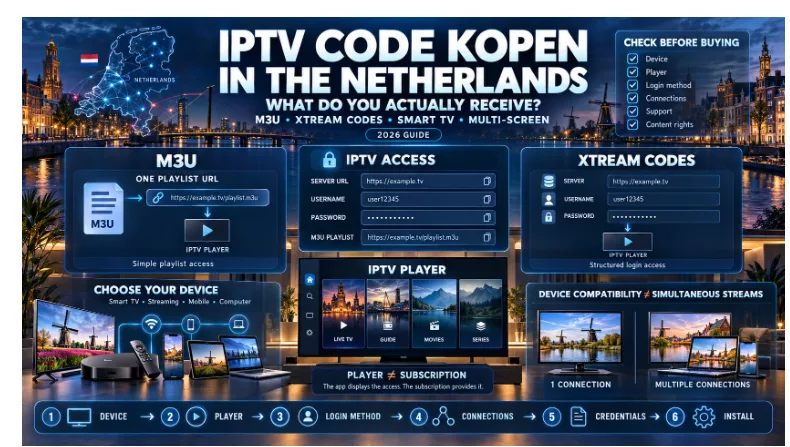
Searching for “IPTV code kopen” in the Netherlands usually means buying personal access credentials for an IPTV service — not purchasing a standalone numerical code. In practice, the buyer will normally receive an M3U playlist URL, an Xtream Codes login consisting of a server URL, username and password, or a device/portal configuration used by certain players and set-top boxes.
Which version you need depends primarily on three things: the device you want to use, the IPTV player installed on that device, and the number of screens that need to stream at the same time.
That distinction is worth understanding before paying for anything.
A subscription can technically be compatible with Smart TVs, Fire TV devices, phones and computers while still allowing only one active stream. Likewise, a perfectly valid Xtream login is of little use if the chosen player only accepts M3U playlists.
This guide explains the complete decision from purchase to working screen.
Quick Answer: What Is an IPTV Code?
An IPTV code is a consumer term for the credentials used to connect an IPTV player to a service.
It commonly takes one of these forms:
| Access method | What you receive | Where it is normally entered |
| M3U | One playlist URL | “Add Playlist” or “M3U URL” |
| Xtream Codes | Server URL + username + password | Xtream/XC login screen |
| Portal login | Portal/server address | Supported set-top box or player |
| MAC/Device activation | MAC address and/or Device Key | Player’s activation website |
So when someone searches for an IPTV “code,” the first question should be:
What does my player actually accept?
What Do You Receive After Buying IPTV Access?
Different providers use different delivery methods, but the underlying goal is the same: the player needs credentials that allow it to retrieve the information associated with the subscription.
M3U Playlist
An M3U setup normally consists of one relatively long URL.
The player downloads the playlist and organizes the entries it contains.
This method is widely supported and can be particularly useful with players that provide menu options such as:
- Add Playlist
- External Playlist
- M3U URL
Because an M3U address can contain account information, it should be treated like a password rather than a public web link.
Xtream Codes Login
An Xtream-style configuration normally contains:
Server URL
Username
Password
Instead of working with one long playlist URL, a compatible player can use these credentials to retrieve structured account information.
That can make categories, movies, series and programme-guide information easier for the application to organize.
Portal or MAC-Based Configuration
Certain IPTV players and set-top boxes work differently.
The application may display:
- MAC Address
- Device ID
- Device Key
The user then visits the player’s management page and associates the playlist or account with that device.
This creates an important distinction:
player/device activation is not necessarily the IPTV subscription itself.
A paid player licence and IPTV access may be two completely separate purchases.
M3U vs Xtream Codes: Which Should You Use?
For most users, this is the most useful comparison.
| Question | M3U | Xtream Codes |
| What do you enter? | One playlist URL | Server + username + password |
| Compatibility | Very broad | Supported by many modern players |
| Large catalogues | Can require larger playlist loads | Often organized in structured categories |
| Movies and series | Depends heavily on player | Usually easier to organize |
| EPG/programme guide | May require separate configuration | Can be integrated by the player |
| Best choice when | The player asks for a playlist | The player provides an Xtream login |
Neither is universally better.
Use the format your chosen player handles most naturally.
If the app presents a dedicated Xtream login screen, use it.
If it asks for an M3U or playlist URL, use the playlist.
Trying to force the wrong format into the wrong field creates many of the login problems beginners interpret as a broken account.
Choose the Device Before Choosing the Login
One of the most common setup mistakes is deciding on a player or access method before checking the device.
A more reliable sequence is:
device → available player → login format → number of connections → subscription
For readers comparing IPTV access in the Netherlands, the first step is to check whether the subscription, intended device and number of screens fit together.
Samsung Smart TV
Samsung televisions generally use Tizen.
App availability can vary by model, model year and region.
Before choosing a player, open the TV’s app store and verify that the exact application you want is available.
LG Smart TV
LG televisions primarily use webOS.
Again, application availability can differ by device generation and country.
Some players accept M3U or Xtream credentials directly, while others use a device-key workflow.
Android TV and Google TV
These platforms generally provide broader player choice.
Modern Android-based players commonly support both M3U and Xtream logins, making this one of the more flexible environments.
Amazon Fire TV
A Fire TV device can be useful when the television’s built-in operating system has limited player options.
The important question remains the same:
Which login methods does the selected application support?
Smartphone or Tablet
Mobile devices are useful for more than viewing.
They can also help diagnose a problem.
If the same credentials work on a phone but fail on the television, the account itself is less likely to be the cause.
Computer
Windows, macOS and Linux can also be useful testing environments because copying URLs and checking credentials is easier than typing them with a television remote.
Dedicated Set-Top Boxes
Dedicated boxes can use M3U, Xtream or portal-based methods depending on the hardware and software.
Always check the exact model and player first.
The IPTV Player Is Not the Subscription
This distinction causes a lot of confusion.
An IPTV player is software.
It does not automatically contain an IPTV subscription.
Installing an application and seeing an empty dashboard does not necessarily indicate a fault. It may simply mean that no playlist or account has been added.
Think of the player as the interface.
The subscription supplies the access.
That is also why paying to activate a player does not necessarily pay for television access.
Some applications have their own one-time licence or premium plan.
That payment goes to the app developer.
If you are unsure which player matches your hardware and login type, a comparison of the best IPTV app for your device can help narrow the choice before setup.
Multiple Devices and Simultaneous Streams Are Not the Same Thing
This is one of the most important points to check before buying.
Suppose an IPTV service works on:
- Smart TV
- Fire TV
- smartphone
- tablet
- laptop
That tells you about compatibility.
It does not tell you how many of those devices can stream simultaneously.
A one-connection account might be installed on several devices while allowing only one active stream at a time.
Example
Imagine the same configuration is present on:
Living-room TV
Phone
Bedroom TV
If the subscription permits only one simultaneous connection, playback may need to stop on the first device before another stream can begin.
A multi-screen package changes the number of simultaneous sessions, not necessarily the number of devices on which the player may be installed.
This is why buyers should ask:
How many people need to watch at the same time?
rather than simply:
How many devices do we own?
How Much Internet Bandwidth Do Multiple Screens Need?
Internet speed should be considered per active stream.
A Full HD stream generally needs less bandwidth than a 4K stream, and simultaneous viewing increases the total demand.
Raw headline speed is not the only factor.
Also consider:
- Wi-Fi signal quality
- router congestion
- other downloads
- gaming
- cloud backups
- video calls
- device performance
- stability of the streaming source
A very fast broadband connection with poor Wi-Fi at the television can perform worse than a slower but stable wired connection.
What Should Dutch Buyers Check Before Paying?
Price is only one variable.
A more useful pre-purchase checklist includes:
| Check | Why it matters |
| Credential type | Determines whether your player can log in |
| Device compatibility | Prevents buying access for an unsupported setup |
| Simultaneous connections | Important for couples, families and multi-room viewing |
| Player licence | Some applications charge separately |
| Delivery method | Know how and when credentials arrive |
| Support | Setup questions often arise after payment |
| Trial/refund conditions | Understand them before paying |
| Payment method | Know how the transaction will be handled |
| Content rights | Technology and distribution rights are separate issues |
This is more useful than choosing solely because one page advertises the largest channel count.
How the Normal Activation Process Works
The technical process is usually straightforward once the correct choices have been made.
Step 1: Choose the Device
Know whether the primary device is Samsung, LG, Android/Google TV, Fire TV, mobile, computer or a dedicated box.
Step 2: Install a Compatible Player
Use the device’s normal app store when possible.
Step 3: Identify the Login Format
Look for options such as:
- M3U Playlist
- Xtream Codes
- Portal
- Device/MAC activation
Step 4: Enter the Credentials Exactly
Pay attention to:
- server address
- username
- password
- port number
- protocol
- accidental spaces
Step 5: Allow the Data to Load
Categories and programme information can take a short time to populate.
Step 6: Test the Setup Before Changing Anything
Open more than one stream and check the connection on the primary device.
For device-specific steps after receiving the credentials, the IPTV installation guide covers the practical setup process.
IPTV Login Not Working? Diagnose It in This Order
Randomly reinstalling applications is rarely the fastest solution.
| Symptom | First thing to check |
| Login rejected | Username, password and server URL |
| Nothing loads | Internet connection and server address |
| M3U fails | Confirm the complete playlist URL |
| Xtream fails | Confirm server, username and password are in separate fields |
| Works on phone but not TV | TV app/configuration |
| Second screen fails | Simultaneous-connection limit |
| Categories load slowly | Device performance, network or large playlist |
| EPG missing | Player/guide configuration |
Testing systematically tells you much more than repeatedly reinstalling everything.
Keep M3U and Xtream Credentials Private
An IPTV login should be handled like other account credentials.
Do not publicly post:
- complete M3U URLs
- usernames
- passwords
- portal addresses containing credentials
- screenshots showing authentication details
Some playlist URLs contain the username and password directly inside the address.
If someone else obtains those details, they may be able to use the account or consume one of its available connections.
Is IPTV Legal in the Netherlands?
IPTV is a television-delivery technology.
Its legality is not determined simply by whether video travels over the internet.
The important question is whether the service has the necessary rights to distribute the content being offered.
Mainstream telecommunications and streaming services also use internet-based delivery.
Problems arise when copyrighted channels, films, series or sports broadcasts are redistributed without authorization.
Consumers should therefore evaluate the rights and legitimacy of the service, not assume that the terms “IPTV,” “M3U” or “Xtream Codes” themselves determine legality.
A 30-Second Decision Tree
Before purchasing, answer these questions in order:
- What device will I use most?
↓
- Which player is actually available on that device?
↓
- Does that player prefer M3U, Xtream Codes or another method?
↓
- How many people need to watch simultaneously?
↓
- Does the subscription provide enough connections?
↓
- Are the payment, support, delivery and refund conditions clear?
↓
- Only then choose the subscription.
That sequence eliminates many avoidable setup mistakes before they happen.
Frequently Asked Questions
What is an IPTV code?
An IPTV code is a consumer term for the credentials that allow a compatible IPTV player to connect to a service. It may be an M3U link, an Xtream Codes login or another supported configuration.
Is an IPTV code the same as an M3U link?
Not always.
An M3U link is one possible form of IPTV access. The term “IPTV code” is broader.
What are Xtream Codes?
Xtream-style access normally consists of a server URL, username and password entered into a compatible player.
Which is better: M3U or Xtream Codes?
Neither is universally better.
M3U offers broad compatibility, while Xtream-style logins can provide more structured categories and metadata in supported applications.
Do I need an IPTV app after buying access?
Usually yes.
The player is the software that loads the credentials and displays the available information.
Can I use one account on multiple devices?
It may be possible to configure it on multiple devices, but simultaneous viewing depends on the subscription’s connection limit.
Can two televisions watch different channels at the same time?
Only when the subscription supports at least two concurrent connections.
Why does the account work on my phone but not my Smart TV?
That can point toward the television app, login format, device compatibility or local network rather than immediately proving that the account is invalid.
Do Samsung and LG TVs use the same IPTV apps?
Not necessarily.
They use different operating systems, and app availability can vary by model, year and region.
Is a Device Key the same as the IPTV password?
Usually not.
A Device Key commonly identifies an application installation, while IPTV credentials authenticate the subscription or playlist.
Does Paying for an IPTV Player Include an IPTV Subscription?
Not necessarily.
Many IPTV players are independent software products and charge separately from the service.
How Much Internet Speed Do I Need?
It depends on stream resolution, network stability and the number of simultaneous streams.
Available bandwidth at the actual viewing device matters more than the advertised maximum speed of the broadband package.
Is IPTV Legal?
The underlying technology is legal.
Whether a particular service is lawful depends on whether it has authorization to distribute the content it provides.
Final Takeaway
The phrase “IPTV code kopen” makes the process sound as if the buyer simply purchases one universal code.
That is not how modern IPTV setups work.
The actual chain is:
device → player → login method → simultaneous connections → credentials → installation
The credential might be an M3U URL.
It might be an Xtream Codes login.
It might involve a portal, MAC address or Device Key.
What matters is that every component is compatible with the next.
The buyer who checks those details before paying is far less likely to encounter the most common problems: an unsupported player, the wrong login format, confusion over app activation, or discovering too late that a one-stream account cannot serve several screens at once.
In 2026, choosing IPTV access intelligently is therefore less about finding the biggest advertised channel number and more about understanding exactly what you receive, where you enter it, and how the household intends to use it.
