



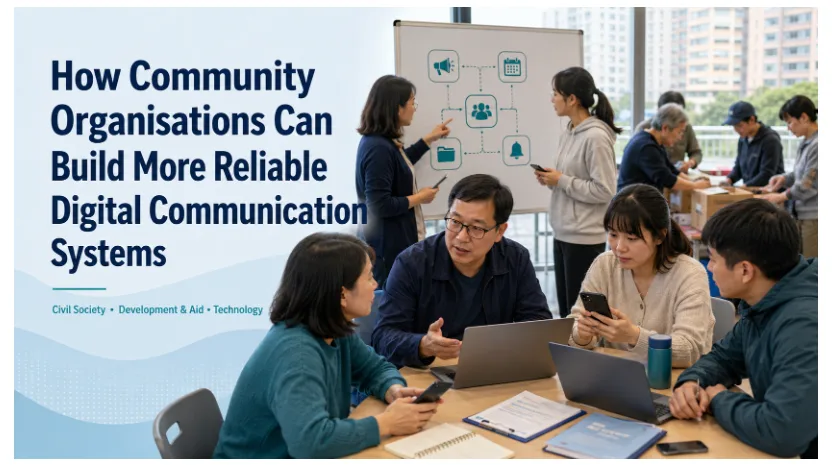
Community organisations, non-profit groups and volunteer networks increasingly depend on digital communication to coordinate people across locations. Messaging platforms can distribute announcements, organise events, mobilise volunteers, share files and support emergency response without requiring everyone to work from the same office.
The system can become difficult to manage when informal chats grow without structure. Public announcements, beneficiary information, event planning, volunteer questions and urgent operational updates may be mixed in one space, while former members retain access and important decisions disappear beneath routine conversation.
A reliable community communication system requires more than choosing an app. Organisations need a clear channel structure, role-based membership, controlled administrator permissions, cross-device file rules and training that works for users with different languages and levels of digital confidence.
Map Communication Needs Before Choosing a Messaging Platform
Community organisations often operate with limited budgets, small administrative teams and a changing group of volunteers. These conditions make communication governance more important, not less.
A local organisation may work with permanent employees, part-time coordinators, temporary volunteers, partner groups, donors, contractors, community leaders and public agencies. In Hong Kong and Taiwan, the same network may also include users who prefer Traditional Chinese, English or other community languages.
Each group needs different information, response expectations and levels of access.
Permanent staff may require planning documents, budgets and beneficiary records. Event volunteers may need only schedules and location details. External partners may need project updates without access to internal discussions.
Adding everyone to the same group increases the risk of oversharing. Creating too many groups creates a different problem: members no longer know where to post or which conversation contains the approved information.
The organisation should therefore define audiences, information sensitivity and record-keeping needs before designing the communication structure.
Separate Announcements, Emergencies and Volunteer Discussion
The first practical step is to map the recurring types of communication the organisation handles and the channel each one requires.
- Official announcements
- Event planning
- Volunteer schedules
- Emergency updates
- Beneficiary support
- Fundraising
- Finance
- Project coordination
- Training
- General discussion
Each communication type has a different operational purpose and should not automatically use the same group or permission model.
Official announcements must remain easy to find. Emergency updates may require immediate attention. Volunteer discussion can be more open, while finance, safeguarding and beneficiary information need stricter access.
A useful communication map records who sends each message, who receives it, expected response time, sensitivity, retention requirements and the devices members are likely to use.
This allows the organisation to design a system around real work instead of forcing every conversation into one chat.
Evaluate Mobile, Desktop and Low-Bandwidth Access
Community networks often include Android phones, iPhones, Windows laptops, shared computers and older devices. Connectivity may vary between offices, homes, community centres and field locations.
Coordinators comparing platforms may begin with a Potato app resource, then verify mobile and desktop support, account recovery, active-session controls, group permissions and file handling against the organisation’s own requirements.
Before adoption, the organisation should confirm:
- Whether the platform supports desktop and mobile devices
- How accounts are created and recovered
- Whether messages synchronise across devices
- How active sessions can be reviewed
- Whether administrators can remove members quickly
- How files are shared and stored
- Whether the platform works reliably on lower-cost devices
- Whether members can use it with limited bandwidth
- Which languages are supported
The organisation should pilot the platform with a representative group before wider adoption.
Testing should reflect real conditions: older phones, shared Windows computers, mobile data, multilingual interfaces and users with limited technical experience. Volunteers should be able to find announcements, download essential files, review sessions and leave inactive groups without assistance.
Separate Official Announcements From Group Discussion
Separating confirmed information from open conversation is one of the most effective ways to improve community messaging.
An announcement channel or restricted group should carry event times, policy changes, emergency instructions, training schedules, volunteer assignments, confirmed decisions and official reminders.
Publishing rights should be limited to authorised administrators so members can trust that the information is current and approved.
Questions, suggestions and daily coordination can take place in a separate discussion group.
This distinction reduces search time and confusion. Members can check one location for confirmed information without reviewing hundreds of conversational messages.
Every group description should state its purpose, who may post, what information belongs there, expected response times, language conventions and the contact point for questions.
The organisation should still avoid unnecessary group proliferation. Every space needs a defined purpose, named owner and review date.
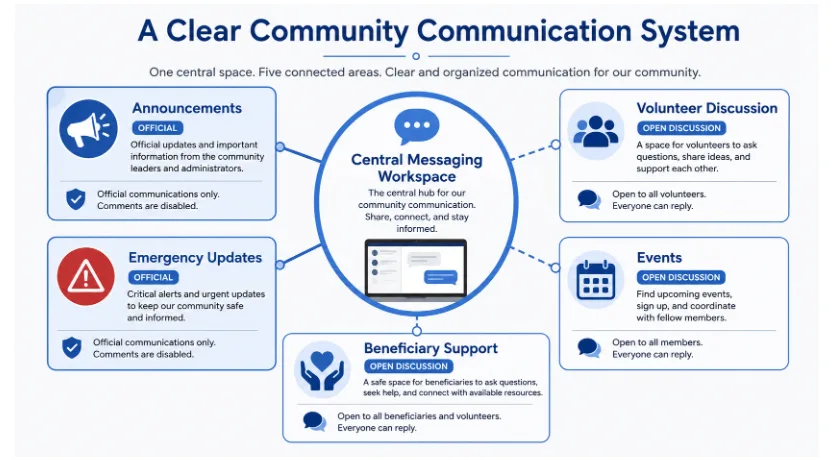
A clear communication architecture separates official updates, open discussion, case-specific support and permanent records.
Build a Cross-Device File and Notification Workflow
Messaging makes file sharing convenient, but it can also create uncontrolled copies, unclear versions and important records that exist only inside chat history.
When planning cross-device operations, a Potato messaging app guide can help teams assess how discussion, files and notifications should be organised across desktop and mobile use.
Common files include volunteer schedules, event posters, training materials, registration forms, budget sheets, meeting notes, referral documents, donor reports and project photographs.
The organisation should define which files may travel through messaging and which must remain in an approved document repository with controlled access.
Messaging should never be the only location for formal records. Once a document is approved, store it in a shared drive, case system or structured archive and link back to that record.
Notification rules matter as much as channel structure. If every message generates an alert, members mute everything. Reserve high-priority spaces for essential communication and allow lower-priority discussion to be reviewed periodically.
Limit Administrator Rights and Temporary Access
Administrator rights should be granted only to people who need them for a defined operational role.
Depending on the platform, administrators may add or remove members, change group information, post announcements, manage permissions, delete messages and control invitation links.
Too many administrators increase the risk of accidental changes, unclear accountability and unauthorised access.
Maintain a simple access register showing the group purpose, owner, current administrators, temporary members, review date and planned access-removal date.
Temporary volunteers, interns, contractors and external partners should not retain access indefinitely. Membership must be reviewed when an event or project ends.
A regular access review prevents former members from remaining in groups that contain operational or sensitive information.
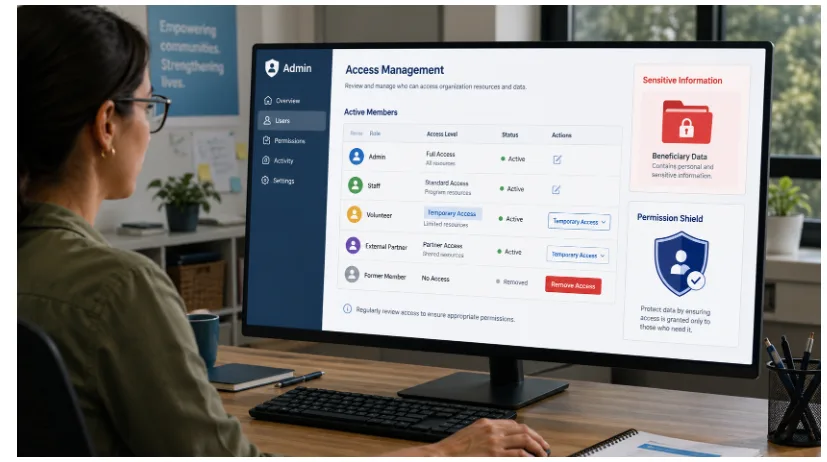
Access should match a person’s role, use the least privilege necessary and end promptly when the work is complete.
Protect Beneficiary and Community Data
Community organisations may handle personal information about vulnerable individuals, families, donors or local partners.
This can include names, addresses, phone numbers, financial details, health information, referral records, immigration information and safeguarding concerns.
Sensitive data should not be placed in large, informal or long-lived group chats.
The organisation should define what may be discussed in messaging, who may access restricted records, where official files are stored, how devices are protected, how long information is retained and how incidents are reported.
Personal information should be shared only when necessary, with authorised people and through the most appropriate channel available.
Members should be trained not to forward screenshots, attachments or private messages outside the organisation without approval.
If a device is lost, an account is compromised or a volunteer leaves, administrators should know how to revoke access quickly and document the response.
Move Formal Decisions From Chat to Permanent Records
Messaging platforms support discussion, but they are weak long-term systems of record.
Important decisions become difficult to locate in long chat histories and may be separated from the documents, dates or approvals that give them context.
After a decision is confirmed, record it in meeting minutes, a decision log, project document, shared spreadsheet, policy file or volunteer-management system.
The record should state what was decided, who approved it, the date, responsible owner, deadline and links to relevant files.
The closing message in the chat can link members to the permanent record. This prevents different groups from relying on different versions of the same decision.
Support Multilingual Users and Different Digital Skill Levels
A communication system is reliable only when members can use it confidently and consistently.
Community organisations may work with volunteers of different ages, languages and technical abilities. Some users move comfortably between mobile and desktop, while others need help with account recovery, file downloads, notifications or active-session checks.
Training should cover joining the correct spaces, identifying official announcements, downloading and storing files, muting non-urgent groups, reporting suspicious messages, protecting account access, responding to lost devices and leaving groups that are no longer required.
Use short instructions, annotated screenshots and practical demonstrations. For Hong Kong and Taiwan audiences, key guidance may need Traditional Chinese and English versions so members can follow the same process.
One or two support contacts can assist users without giving administrator rights to everyone.
For multilingual communities, translated instructions should use consistent terminology for group roles, privacy settings, files and security actions.
Audit Inactive Groups and Access Regularly
Digital communication systems require scheduled maintenance rather than one-time setup.
Without review, organisations accumulate inactive groups, duplicate conversations, former volunteers, old administrators, outdated files, unused invitation links and conflicting announcements.
A quarterly audit can test whether each group is still needed, access is correct, administrator rights remain appropriate, files have been archived, emergency contacts are current and members still understand the channel structure.
Archive or close inactive spaces and replace invitation links that may have circulated beyond the intended audience.
The review should also ask whether the platform still fits the organisation’s size and risk profile. A system designed for twenty volunteers may not remain manageable when the network expands across districts or regions.
Conclusion: Build a Communication System, Not Just More Chats
Reliable digital communication depends on governance as much as the messaging platform itself.
Community organisations need clear rules for announcements, discussion, files, membership and administrator permissions. They must protect beneficiary information, preserve formal decisions and support users with different languages and levels of digital skill.
A simple and well-governed system can reduce confusion, strengthen accountability and help volunteers coordinate across distance.
The goal is not to create more groups or send more messages. It is to deliver the right information to the right people, through the right channel, with appropriate access and a permanent record when one is required.
