



Introduction
You’re not alone if you’ve ever struggled with switching tabs during video calls, coding, editing, or multitasking. In 2025, a laptop monitor extender will be one of the hottest solutions for mobile productivity. Enter the Cevaton T2 Pro, a dual-screen extender to boost your laptop’s productivity.
But how good is it? This in-depth review will explore everything from the T2 Pro’s display specs to its real-world performance, setup process, and how it compares to the competition. Whether you’re a remote worker, creative professional, or student, this might be the best laptop screen extender.
Part 1: Cevaton T2 Pro Specs — Size, Compatibility, and Display Details
The Cevaton T2 Pro is a thoughtfully engineered laptop monitor extender designed to facilitate multitasking at your desk, in a café, or an airport lounge.
Display Size & Resolution
The T2 Pro features two 14-inch Full HD 1080P displays with a crisp 1920×1080 resolution. Each screen uses an IPS panel to provide vivid color reproduction, wide viewing angles, and reduced eye strain—excellent for anyone in front of a screen.
Both monitors have an anti-glare matte finish, which is ideal for working in bright environments or outdoors.
Build Quality & Materials
The extender has a lightweight ABS frame and aluminum alloy components, giving it a premium look and a solid feel without adding too much bulk. At just around 3.5 lbs, it’s light enough to slip into a backpack or briefcase without hassle.
Operating System Compatibility
The Cevaton T2 Pro is plug-and-play compatible with:
- Windows 7 and above
- macOS 10.10 and above
- Linux
- ChromeOS
You can install more M1 and M2 MacBooks software using this app, giving it broader usefulness for more users.
Supported Laptops
It works with 13–17.3-inch laptops for brands such as Apple, Dell, HP, Lenovo, ASUS, Acer, and many others. When your computer has the correct ports and power, you should have no issues with the T2 Pro.
Connectivity Options
The extender supports multiple port types:
- USB-C (with DisplayPort support)
- HDMI
- USB-A (with adapter)
Multiple cables are included in the box to ensure compatibility, and you won’t need an external power supply in most cases.
Travel-Ready Design
Thanks to its foldable, compact design, the T2 Pro folds neatly behind your laptop when not in use. This makes it one of the most portable monitor extenders in its category—perfect for hybrid workers or business travelers.
Part 2: Top Features That Make T2 Pro the Best Laptop Screen Extender
If you’re looking for the best laptop screen extender, the T2 Pro is a strong contender. Its impressive features are designed for modern workflows.
Dual-Screen Folding Design
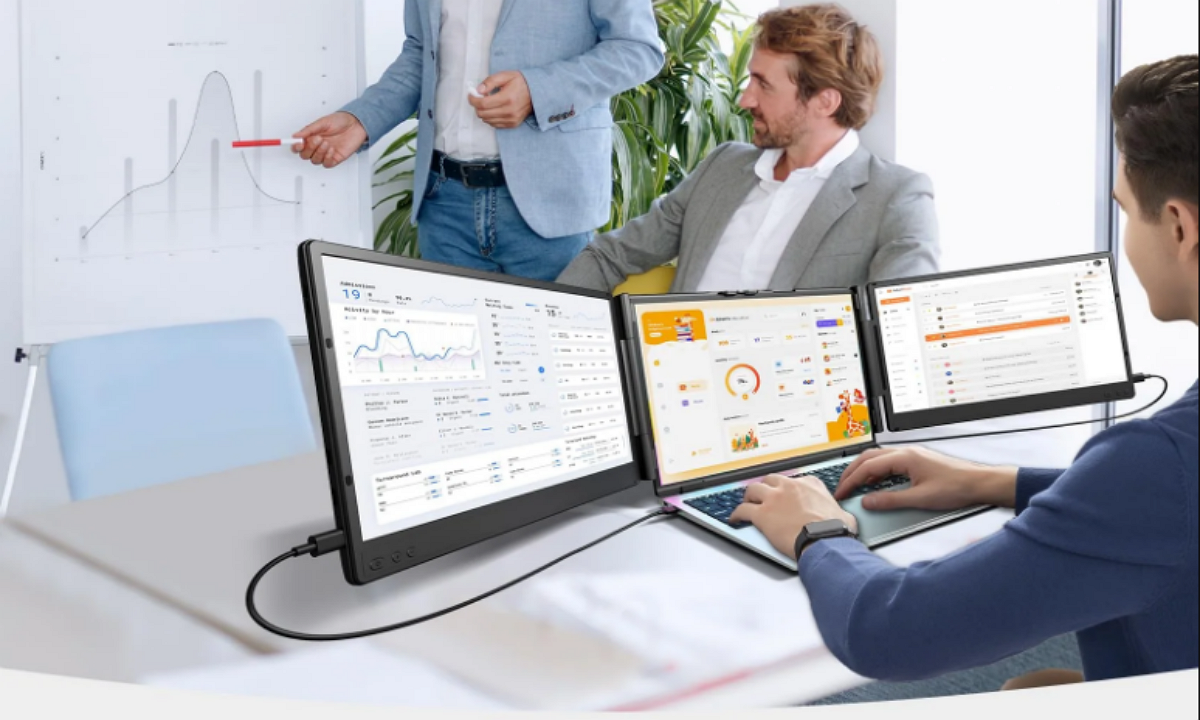
This isn’t just one extra screen—it’s two. The T2 Pro features a dual-screen setup that wraps around your laptop, allowing for a seamless triple-screen experience. This is great for comparing documents, editing timelines, or monitoring stock charts while you work.
1080P Full HD with Anti-Glare Tech
Both screens support Full HD resolution (1920×1080), enough for everyday tasks, video editing, and even light gaming. The anti-glare coating ensures your eyes won’t suffer in bright rooms or under harsh lighting.
Adjustable Viewing Angles and Brightness
Do you need to tilt the screen for a better view or dim the brightness during a night flight? The T2 Pro has your back. Each screen can be independently adjusted for angle and brightness, helping you get the proper setup.
Lightweight, Energy-Efficient Build
The T2 Pro saves time and power. Its low energy consumption allows it to run off your laptop without draining your battery too quickly, making it perfect for extended sessions on the go.
Part 3: Use Cases — How This Extra Monitor for Laptop Fits Your Workflow
Whether you’re a digital nomad or a student burning the midnight oil, the T2 Pro adapts to your daily grind. Here are a few ways an extra monitor for a laptop boosts productivity.
- For Business Travel and Mobile Professionals
Working on the go? The T2 Pro gives you the screen space of a desktop setup without the bulk. Review a presentation on one screen, take notes on another, and join a Zoom call on your laptop—all simultaneously.
- For Coding, Video Editing, or Creative Work
Programmers can debug on one screen while referencing docs on another. Video editors can preview footage while editing timelines. Designers can keep assets open while working on layouts. Creative workflows just got a significant upgrade.
- For Simultaneous Stock Trading and Handling Others
People who trade can watch charts, follow updates, and make trades simultaneously. With the two screens, checking market fluctuations isn’t as complicated as constantly cycling through tabs.
- For people who study and work remotely
Are you planning to watch online lectures? You can watch the lecture and take notes on two devices simultaneously. A remote worker can use one display for their management tool and another for Slack or email messages—low-cost productivity.
Part 4: T2 Pro vs. Others — Why This Laptop Monitor Extender Stands Out
Let’s talk competition. There are dozens of laptop monitor extenders out there. So, how does the Cevaton T2 Pro compare?
Comparison with Other Extenders
Compared to similar extenders like the Trio Max, Xebec Tri-Screen, or LIMINK LK14, the T2 Pro stands out for offering:
- Higher resolution IPS panels
- Better angle adjustability
- Lighter and more compact folding design
- Improved macOS support
Performance vs. Pricing
While it’s not the cheapest on the market, the T2 Pro provides solid value for money at around $479 (subject to sales). Most devices get two high-quality screens, multiple cables, and a driver-free setup.
Ease of Use
Many extenders require clunky software or fiddly drivers. Not here. The T2 Pro is largely plug-and-play, especially with modern USB-C laptops. Setup takes under 5 minutes.
Customer Reviews
People who use it regularly say they love it. They usually praise this product for its solid build, portability, and dependability. What customers like best is how well the new models work and the excellent service they get from Cevaton.
Part 5: Step-by-Step Guide to Using the Cevaton T2 Pro Monitor Extender
If you’re wondering about the setup, here’s a quick guide to help you get started with the T2 Pro.
Unboxing & What’s Included
Inside the box, you’ll find:
- 1x Cevaton T2 Pro dual-screen monitor extender
- 2x USB-C to USB-C cables
- 1x HDMI cable
- 1x USB-A to USB-C adapter
- 1x User manual
- 1x Storage bag
Connecting to Your Laptop
For USB-C Laptops:
- Plug in both screens using the included USB-C cables.
- Most laptops detect them automatically.
For HDMI Laptops or USB-A Only Devices:
- Use the HDMI and USB-A adapter combo.
- You may need to install drivers (available on Cevaton’s website).
Adjusting Settings
Once connected:
- Use your laptop’s display settings to extend or mirror screens.
- Adjust brightness using the physical buttons on the monitors.
- Tilt screens outward for a wrap-around view or inward for more privacy.
Travel & Storage Tips
- Fold both screens in and secure with the built-in clip.
- Use the included storage bag to avoid scratches during travel.
- Keep the cables in a pouch or organizer to prevent tangling.
Compatible Brands and Laptops
The T2 Pro has been tested with:
- MacBook Air/Pro (M1, M2 included)
- Dell XPS, Latitude, Inspiron
- HP Spectre, Envy, Pavilion
- Lenovo ThinkPad, Yoga, IdeaPad
- ASUS ZenBook, ROG series
- Acer Swift, Predator
Final Verdict: Is the Cevaton T2 Pro Worth It?
If you’re looking for a dependable, high-quality laptop monitor extender that won’t let you down in a meeting, on a flight, or in a coffee shop, the Cevaton T2 Pro hits the mark. Its dual Full HD screens, connectivity with every platform, and portability make it one of the year’s best laptop screen extenders. Whether you’re editing videos, analyzing data, dealing with stocks, or learning online, you will notice a difference with the professional monitor for your laptop. It feels like you’re updating your computer, even though it’s not a new one
 Pros:
Pros:
- Two Full HD screens
- A portable version that’s easy to carry
- Supports both different operating systems and a range of laptop brands.
- Everything you need for setup is included.
- Made for those who want to multitask easily
 Cons:
Cons:
- Costs more than a few similar products
- Needs to be installed on older macOS systems.
- Bottom Line:
- The T2 Pro is meant to get work done, but it has also changed how creators and telecommuters interact with technology.
Visit this page to see the Cevaton T2 Pro: Cevaton T2 Pro Laptop Monitor Extender.
