




OnePlus phones generally have good battery life, come with a handy battery-saving mode in the quick settings, and are among the fastest phones to recharge when they run low. Whether you’re constantly feeling the battery drain or you’re just curious about which apps and processes are using up juice the fastest, there’s an easy way to check on your OnePlus’ battery statistics. We’ll show you where this feature lives in the settings, and what you can do to optimize your battery performance moving forward.
How to view battery usage figures on your OnePlus phone
- Open the Settings app, or swipe down to access the quick settings menu and tap on the gear icon.
- Scroll down and tap on Battery.
-
Tap on View Detailed Usage.

- Here you will see a breakdown of which apps have been using your battery. Tap on an app.
-
Here you can select if you want the OS to use Intelligent Control to manage battery usage for that app, or if you’d prefer to manually Optimize the app’s battery usage.

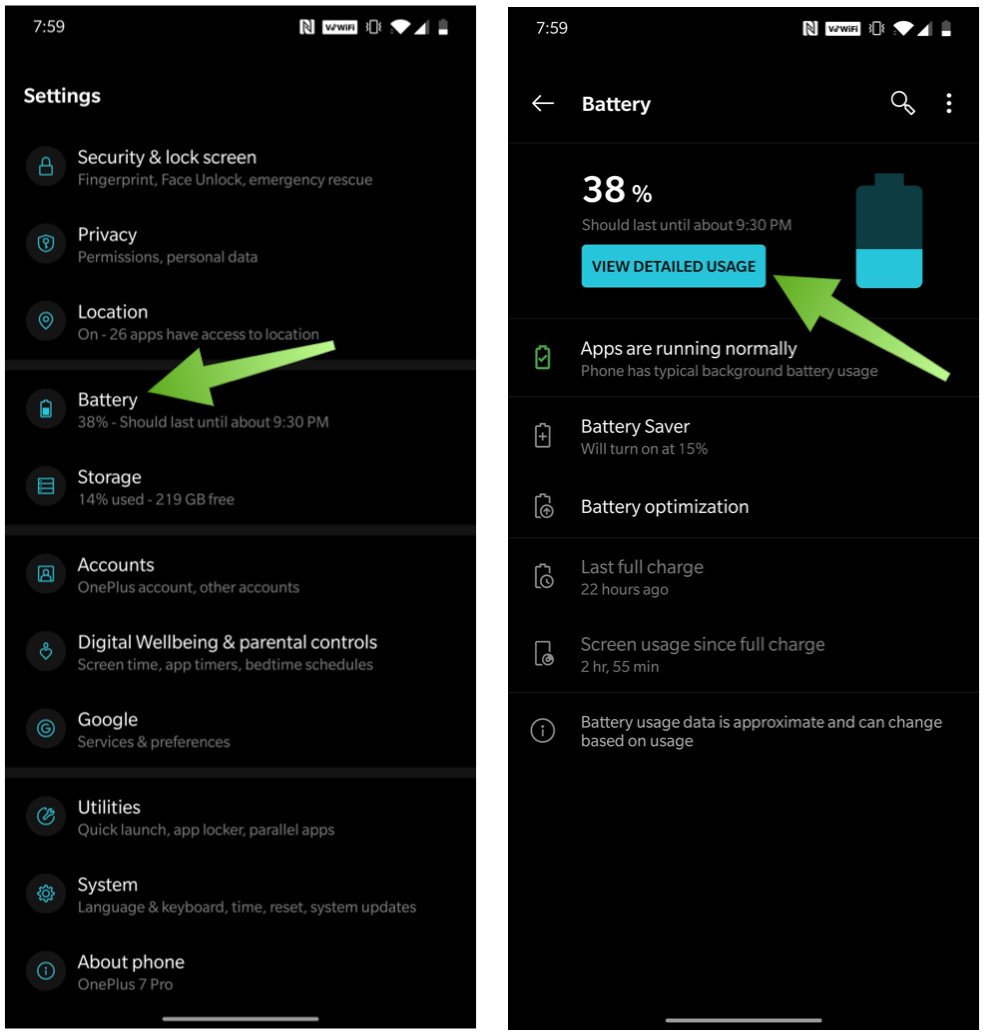

OnePlus has a Battery Saver mode that you can see from this settings screen or access from the quick settings menu. Battery Saver mode will turn off or restrict background activity for your apps along with some other under-the-hood tweaks to try to help extend your battery’s life. You can set a toggle to turn off Battery Saver mode once your phone hits 90% on the charger, or you can set a schedule for it to turn on automatically based on a certain percentage (like 15%).

If you tap on Battery optimization, you can elect to optimize battery usage per app, just like we mentioned above. This is set to “Intelligent Control” by default, meaning your phone should adjust how an app uses battery by learning your usage patterns. However, if you want to control this manually, you can do so by tapping on each app and switching from Intelligent Control to Optimize.

Our top equipment picks
If your old OnePlus phone just can’t hold a charge like it used to, we highly recommend the latest and greatest OnePlus 8.
Contact Information:
JERAMY JOHNSON
Tags:
, Wire, United States, English
Contact Information:
JERAMY JOHNSON
