The move from Seedance 2.0 to Seedance 2.5 is not only a version update. It reflects a wider change in AI video creation, from short visual experiments toward longer, more controllable workflows that creators can use for real projects.
AI video has entered a more practical phase. The first wave of tools proved that a prompt could create motion. That was enough to attract attention, but it did not answer the harder question: could generated video become part of everyday creative work?
That question matters now because creators, brands, educators, and small production teams are no longer satisfied with a single impressive clip. They want results that can hold a scene, respect references, support revision, and fit into a campaign, tutorial, product page, or storyboard.
The release of Seedance 2.5 makes the comparison with Seedance 2.0 worth revisiting. Seedance 2.0 helped establish what AI video generation could do for quick drafts and visual exploration. Seedance 2.5 points to where the workflow is moving next.
Seedance 2.0 Made AI Video More Accessible
Seedance 2.0 arrived at a time when many users were still testing the basics of AI video. The typical workflow was simple: describe a scene, generate a short clip, review the output, and try again. For creators, that was already useful. It made video ideation faster and lowered the barrier for people who did not have a full production team.
In that stage, the main value was speed. A marketer could test a visual idea. A creator could turn a short prompt into motion. A designer could explore a scene before building a more polished asset. The tool helped people move from text to visual output without starting from traditional editing software.
But short AI clips also revealed limits. A video could look attractive for a few seconds and still be difficult to use in a complete project. Characters might drift. Products might change shape. Camera movement could feel dramatic but not purposeful. A scene might stop before the idea had enough time to develop.
Seedance 2.5 Moves Toward Longer Workflows
The biggest difference with Seedance 2.5 is the direction of the workflow. Instead of treating AI video as a quick prompt experiment, the newer release places more emphasis on longer video creation, richer reference control, higher-quality output, and more flexible refinement.
That matters because real video work is not only about the first generation. It is about keeping an idea coherent from start to finish. A product teaser needs a clear reveal. A social clip needs a strong hook and ending. A training video needs enough time to explain one point. A storyboard needs motion that can be reviewed by a team.
Longer generation gives creators more room to test these ideas. It also makes weaknesses more visible. If the model cannot maintain consistency, a longer clip will show it. If the motion supports the story, the value becomes clearer.

Reference Control Is a Major Shift
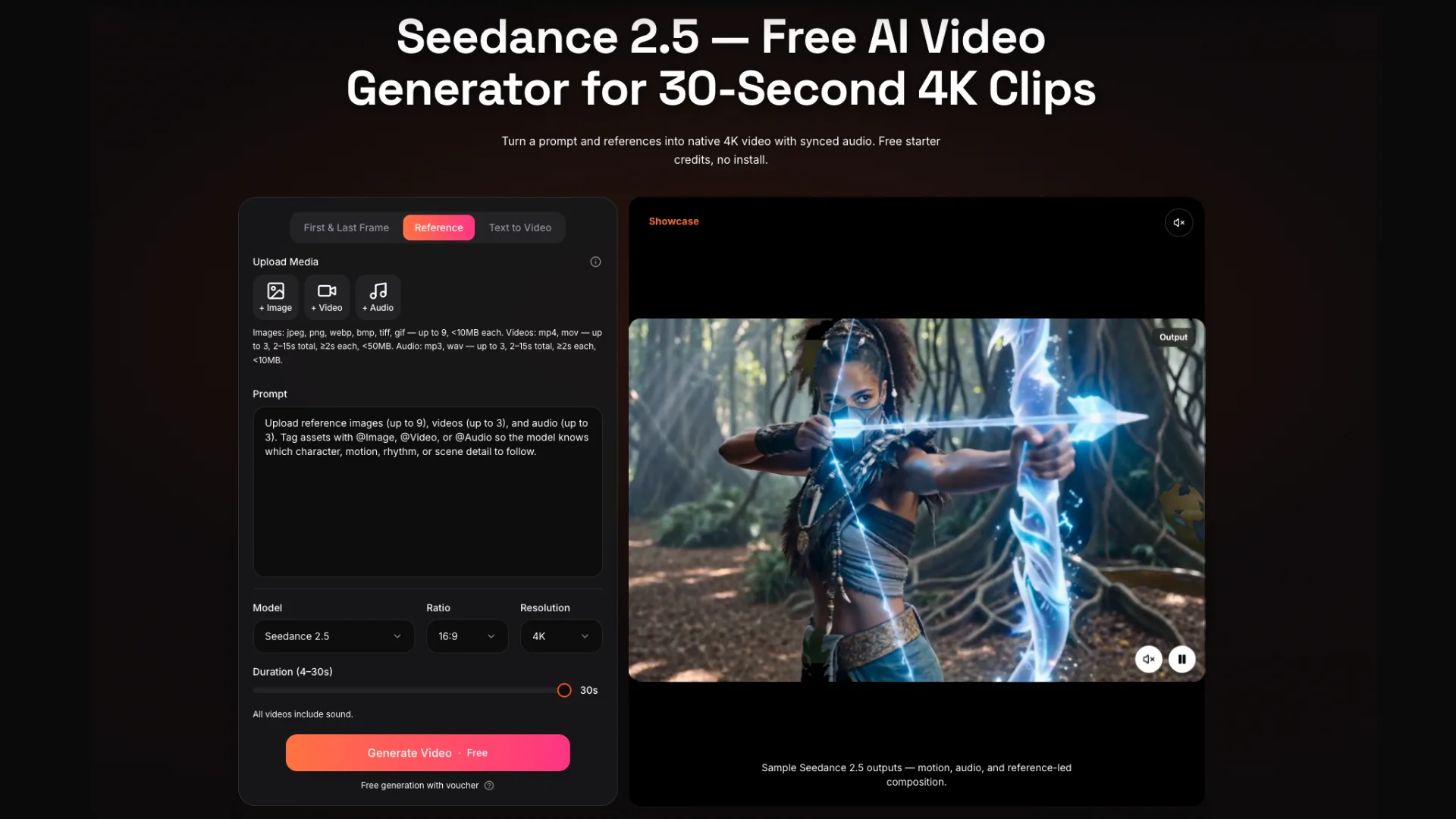
One of the most important changes in modern AI video is the movement away from text-only prompting. Text is useful, but it often carries too much responsibility. It has to describe the subject, action, camera movement, style, lighting, mood, and ending. That can make results unpredictable.
Reference-based workflows give creators another way to guide the output. A product image can help preserve visual identity. A style frame can define color and composition. A video reference can suggest movement. Audio can shape rhythm or atmosphere. The prompt then becomes a set of instructions connecting those materials.
This is where the difference between Seedance 2.0 and 2.5 becomes less about a simple feature list and more about creative control. The newer workflow encourages creators to bring more of the brief into the generation process.
From Short Experiments to Usable Drafts
The shift from Seedance 2.0 to Seedance 2.5 also reflects a change in user expectations. Early users were often impressed if a model could produce a visually striking clip. Today, many users ask whether the clip can become part of a finished project.
That changes how AI video should be judged. A clip should not only look good in isolation. It should be clear enough to review, stable enough to revise, and flexible enough to adapt to a real format. For a business, that could mean a product launch draft. For a creator, it could mean a social video. For an educator, it could mean a short explainer.
A practical Seedance 2.5 comparison should therefore focus on workflow changes, not only visual quality. The real question is whether the newer model helps reduce the gap between an idea and a usable first draft.
Editing and Refinement Matter More Now
Another reason the comparison matters is revision. AI video often fails not because the first clip is unusable, but because one detail is wrong. A camera move is too fast. A product is slightly distorted. A background element distracts from the subject. A final frame does not work for publishing.
If every small problem requires a full restart, the workflow becomes slow. More flexible editing and refinement help turn AI video into something closer to a production process. Creators can keep the useful parts of a clip and adjust the parts that need attention.
This does not remove human judgment. It makes that judgment more important. The creator still decides what the clip should communicate, which references matter, and when the result is good enough to move forward.
What This Means for the AI Video Market
The broader lesson is that AI video is becoming less about isolated generation and more about repeatable creative systems. That is a meaningful shift for the industry. It affects how creators test tools, how brands prepare campaigns, and how small teams plan video content.
Seedance 2.0 belongs to the phase where AI video became more approachable. Seedance 2.5 belongs to the next phase, where creators expect more control, longer structure, better references, and smoother revision.
This does not mean every user needs the most advanced workflow. Some creators still need quick visual ideas. Others need polished drafts. The point is that AI video tools are now being judged by a wider set of needs.
How Creators Should Compare the Two
A fair comparison should begin with a real task rather than a random prompt. Creators can test a product image, a character reference, a short explainer scene, a social clip, and one longer story-driven prompt. The goal is to see how each workflow handles continuity, motion, prompt adherence, and revision.
- Does the subject stay consistent across the full clip?
- Do references clearly influence the output?
- Does the scene have enough time to communicate the idea?
- Can small details be refined without starting over?
- Would the result work as a real draft for a campaign, tutorial, or storyboard?
These questions are more useful than asking which version creates the most dramatic single sample. They show whether the model fits the way creative work actually happens.
Final Thoughts
Seedance 2.0 helped make AI video creation more accessible. The interest around Seedance 2.5 AI video creation shows how quickly the category is moving toward more complete creative workflows. The difference is not only in output quality. It is in duration, reference control, editing, and the ability to turn generated motion into something people can review and refine.
For creators and organizations watching the AI video market, that is the most important takeaway. The next stage of AI video will not be measured only by prettier clips. It will be measured by how well tools help people move from an idea to a controlled, usable video draft.