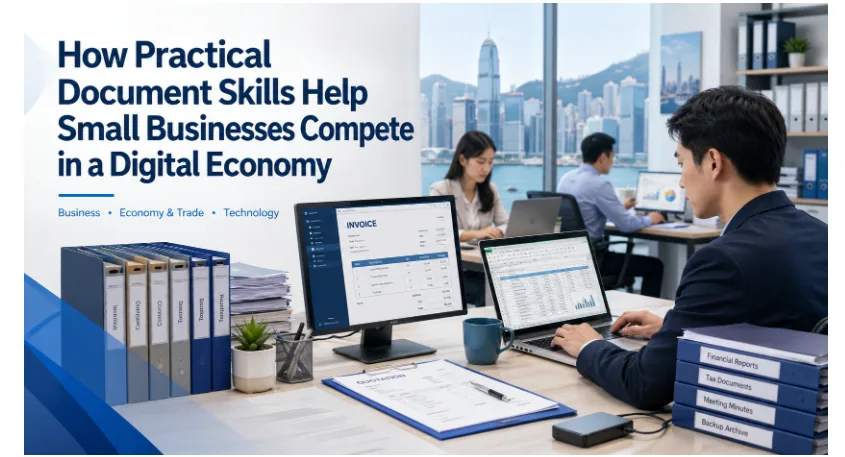

Digital transformation is often framed around artificial intelligence, cloud platforms and advanced automation. Yet for many small businesses, competitiveness still depends on a more practical capability: creating, organising, sharing and protecting the documents used in everyday operations.
Invoices, quotations, contracts, stock records, customer lists, budgets and reports form the operational backbone of a small enterprise. Weak document management leads to duplicated work, outdated files, slower customer service and avoidable accounting or administrative errors.
A well-designed small-business document workflow can improve productivity, customer trust and resilience without requiring an expensive enterprise system. The essentials are reliable office software, reusable templates, consistent file names, controlled versions, shared storage and backups that can actually be restored.
Why Small-Business Document Management Matters
Large companies may have dedicated administrative teams, document-management platforms and formal approval processes. Small enterprises usually operate with fewer people, so one employee may handle sales, customer support, purchasing, invoicing and basic finance in the same day.
That concentration of responsibility makes simple and repeatable document habits especially valuable.
A poorly named spreadsheet can delay payment. An outdated quotation can reach a customer. A contract stored on one laptop can disappear when the device fails. The business may also become dependent on the only employee who knows where key files are kept.
These are operational risks, not minor inconveniences. They can affect cash flow, compliance, customer relationships and continuity during staff changes, remote work or technical disruption.
Strong document practices help small businesses:
- Prepare professional quotations and invoices
- Track income, expenses and inventory
- Maintain consistent customer records
- Share information between employees
- Preserve approved contracts and reports
- Respond more quickly to clients and suppliers
- Reduce dependence on individual staff members
- Recover more easily from device loss or file deletion
For SMEs serving customers in Hong Kong, Taiwan or wider regional supply chains, professional documents also shape credibility. Clear bilingual quotations, accurate spreadsheets and well-formatted proposals can make cross-border communication easier and help partners assess whether the business is organised and dependable.
Choose Office Software Around Real Business Workflows
Small businesses should choose office software around the work they actually perform, not the number of features promoted on a product page.
A retailer may need dependable spreadsheets, invoices and stock records. An exporter may prioritise Traditional Chinese and English document compatibility, PDF output and files that can be exchanged with overseas partners. A consultancy may rely more heavily on proposals, reports and presentations.
Small enterprises comparing office software should test file compatibility, spreadsheet accuracy, Traditional Chinese font rendering and PDF export before selecting WPS Office for invoices, reports and cross-border document exchange.
The evaluation should include several practical questions:
- Can existing documents be opened without broken formatting?
- Do formulas and tables work correctly?
- Can files be exported to PDF?
- Does the software perform well on older Windows computers?
- Can employees work offline when internet access is unreliable?
- Are common document formats supported?
- Can templates be reused across the team?
- Are updates and security patches available?
- Is the interface easy enough for employees with limited digital experience?
Businesses should test software with real files rather than sample documents. Current invoices, customer spreadsheets, contracts and presentations reveal whether fonts, page breaks, formulas and layouts remain stable in day-to-day use.
This is especially important when documents move between Hong Kong, Taiwan and international partners that may use different operating systems, office suites, fonts or language settings.
Standardise Windows Office Software Across the Team
When employees use different applications, versions or default file settings, document compatibility problems become more likely.
One computer may substitute a Traditional Chinese font. Another may display a spreadsheet formula differently. A presentation may look correct on the creator’s laptop but break when opened during a client meeting or supplier review.
Teams relying on desktop computers can use a WPS Office for Windows resource to standardise installation, default file associations, templates and update procedures across the business.
A simple software standard can define:
- The approved office application
- The supported software version
- Where the installer should be obtained
- Which file types open by default
- Whether automatic updates are enabled
- Which templates employees should use
- Who is responsible for technical support
The business should first install and test the chosen configuration on one or two computers. Once file opening, printing, PDF export and templates are stable, the same setup can be rolled out across the team.
A basic device record showing the installed software version, update status and responsible user makes troubleshooting easier and helps managers identify unsupported or inconsistent systems.
Standardisation does not mean every employee needs every feature. It creates a shared environment in which business documents move between people and devices without unnecessary rework.
Build Reusable Invoice, Contract and Report Templates
Reusable templates reduce preparation time, improve brand consistency and prevent recurring omissions.
Without controlled templates, employees may start from a blank page, copy an outdated file or reuse documents containing old prices, bank details, contact information or legal wording.
A small business can create reusable templates for:
- Quotations
- Invoices
- Purchase orders
- Contracts
- Project proposals
- Meeting notes
- Expense reports
- Stock sheets
- Client onboarding forms
- Monthly performance reports
Each template should contain approved branding, contact details, payment information, language conventions and the standard fields required for that document type.
Master templates should be stored in a clearly labelled shared folder with editing restricted. Employees create a copy for each new job while the approved master remains unchanged.
Templates also need scheduled review. Prices, tax details, legal clauses, bank information, company addresses and bilingual wording can change, and old copies should be archived so they are not reused by mistake.
For small firms with limited administrative capacity, templates act as embedded guidance. A well-designed invoice or report structure prompts employees to include the information needed for payment, approval and record-keeping.
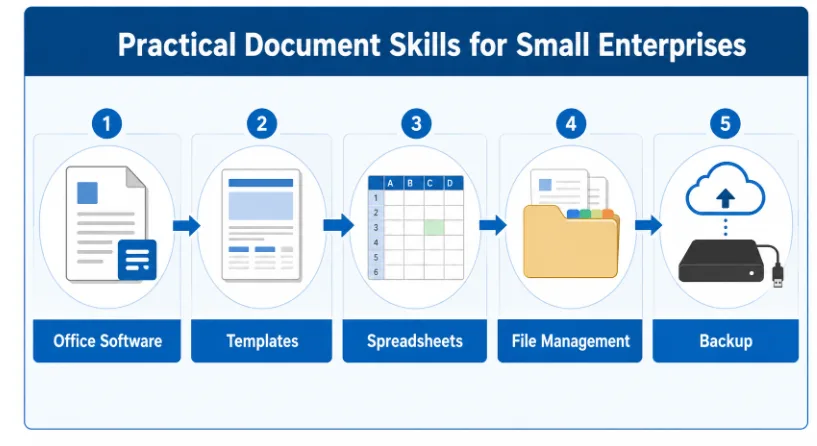

Office software, templates, spreadsheets, file naming, approvals and backup should operate as one connected document workflow.
Use Clear File Names and Version Control
Many document-management problems begin with vague file names and unclear ownership.
Names such as “new invoice”, “final contract” or “latest spreadsheet” give little useful information. After several revisions, a folder may contain multiple files that all appear current.
A clear naming system can include:
Client_Project_Document_Date_Version
For example:
LakesideMarket_SupplyAgreement_2026-07-24_v03.docx
A consistent file name should identify the client or supplier, project, document type, date, version and, where useful, language or approval status.
Version numbers are more reliable than repeated use of the word “final”. A document can move from v01 for the first draft to v02 for internal review, v03 for customer revisions and v04 for the approved version.
After approval, the file name can include a clear status such as Approved, Signed, Issued or Archived.
The business should also define who may approve the final version. Without clear authority, several employees may edit the same file or send conflicting copies to a client.
For important records, retain the editable source file and export the approved version to PDF so the issued layout is easier to preserve.
Protect Business Documents With Shared Storage and Tested Backups
Documents stored only on individual laptops are difficult to govern and easy to lose.
A device can fail, be stolen, infected by malware or accidentally reset. An employee may also leave the company without transferring files stored in a personal folder.
Shared storage gives the business greater control over current records. Depending on scale, this may be a managed cloud folder, a company network drive or another access-controlled document system.
A simple folder structure might include Finance, Clients, Contracts, Projects, Templates, Operations, Human Resources and Archive.
Access permissions should follow job responsibilities. Payroll files, employee records, customer data and signed agreements should not be available to every member of staff.
Shared storage is not the same as a complete backup. Files can still be overwritten, deleted, encrypted by malware or lost through account problems, so at least one independent recovery copy is needed.
A practical approach includes primary shared storage, automatic versioned backup, a separate offline or external copy for critical records and periodic recovery tests.
Backups should run automatically where possible. Manual copying is often skipped when staff are busy or working across several locations.
The business should regularly restore a sample invoice, spreadsheet and contract. A backup that has never been tested may create confidence without providing real recovery capability.
Train the Whole Team in Digital Document Skills
Small enterprises often rely on one employee who understands the software, spreadsheets, templates and folder structure.
That dependence creates a single point of failure. If the person is absent or leaves, invoicing, reporting or customer service may slow down immediately.
Core document skills should therefore be shared across the team and included in onboarding.
Training can cover opening and exporting common file types, using approved templates, applying file names, recording versions, locating final documents, recovering deleted files, identifying suspicious attachments and reporting software or access problems.
Training does not need to be highly technical. Short written guides, annotated screenshots, screen recordings and practical exercises are often more useful than a long software demonstration.
New employees should receive document-workflow guidance before handling live customer or financial files. Existing staff should be updated whenever templates, software or storage rules change.
Managers must follow the same process. If senior staff continue saving files on personal desktops or sending multiple unlabelled attachments, the rest of the team is unlikely to adopt the standard workflow.
Design Inclusive Workflows for Multilingual and Resource-Constrained SMEs
Digital business programmes often emphasise advanced technology while overlooking the practical conditions under which micro and small enterprises operate.
Businesses in Hong Kong and Taiwan may need Traditional Chinese and English templates, mobile approval and cross-border file exchange. Rural, women-led and community enterprises may also face unreliable connectivity, shared devices, older computers or limited access to technical support.
Document systems should therefore be designed around real devices, languages, staff capacity and connectivity rather than an idealised office environment.
- Software that can work offline
- Applications that perform well on lower-cost devices
- Training in local languages
- Simple templates that reflect local business requirements
- Backup processes that do not depend on constant connectivity
- Shared access that does not require every employee to own a computer
- Mobile-friendly review processes
- Clear explanations of file security and privacy
Support programmes should not assume that installing software automatically creates digital capacity. Businesses need practice, clear responsibility and processes that remain manageable after formal training ends.
Practical office skills help enterprises participate in formal markets. Better invoices, records, contracts and reports can support finance applications, procurement opportunities, tax preparation and business partnerships.
For women-led, family-run and community-based enterprises, these skills can also reduce dependence on outside intermediaries for routine administrative work.
Conclusion: Build a Document Workflow People Can Maintain
Small businesses compete in a digital economy through everyday operational discipline as much as through advanced technology.
Reliable office software, reusable templates, accurate spreadsheets, clear file names, controlled access and recoverable backups can materially improve efficiency and resilience.
The best document-management system is not necessarily the most complex. It is the one employees understand, follow and can maintain across Windows computers, mobile devices, languages and working locations.
By building practical document skills across the team, small enterprises can reduce errors, respond faster to customers and protect the information on which daily operations depend.