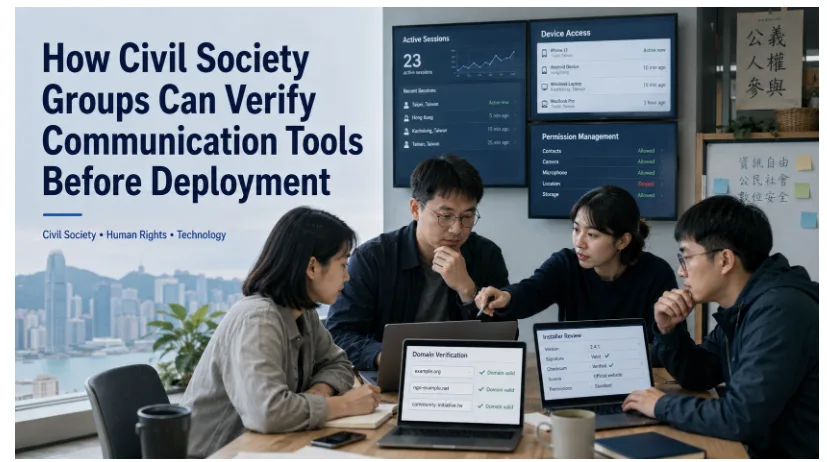

Civil society organisations, journalists, volunteer networks and community groups rely on messaging apps to coordinate work across locations. These tools can distribute updates, organise events, exchange documents and support rapid response during emergencies.
The same tools create security and governance risks when they are introduced without verification. A misleading download page, outdated installer, uncontrolled desktop session or administrator account with excessive permissions can expose sensitive contacts, internal discussions or operational plans.
For organisations working with vulnerable communities, confidential sources or sensitive public-interest issues, communication software should be assessed as part of organisational risk management rather than treated as a simple convenience.
A structured deployment process helps teams in Hong Kong, Taiwan and cross-border networks verify websites, installers, device access, active sessions and account permissions before staff and volunteers begin using a new platform.
Assess Organisational Risk Before Comparing Messaging Apps
Before comparing platforms, an organisation should understand the risks connected to its work, people and operating environment.
Different groups face different threats and consequences if communication fails or an account is compromised.
A volunteer network may mainly need dependable scheduling and announcements. A human-rights group may handle confidential testimony. A newsroom may communicate with protected sources. A community organisation may work in environments where devices are shared, searched, lost or confiscated.
A basic risk assessment should consider information sensitivity, vulnerable contacts, targeted phishing, personal versus organisational devices, shared computers, cross-border work, connectivity conditions, the impact of account compromise and the technical confidence of staff and volunteers.
The organisation should identify who is most exposed. New volunteers, administrative staff and external partners may have less security training than senior employees and can become easier entry points.
The objective is not to predict every threat. It is to prioritise failures that would cause the greatest harm and build proportionate controls around them.
Classify Sensitive Contacts, Conversations and Files
Not every conversation requires the same level of protection or retention.
Civil society groups should classify the information they handle before deciding which platform, group or device may be used.
- Names of beneficiaries
- Contact details of journalists or sources
- Health or legal information
- Safeguarding reports
- Financial records
- Travel plans
- Protest or campaign logistics
- Internal security discussions
- Donor information
- Personal identity documents
The organisation should decide which information may be discussed in group chat, which requires a smaller restricted space and which must be stored outside messaging.
Volunteer schedules may be suitable for a general coordination group, while detailed case files, identity documents and source records should normally remain in a controlled system.
A simple information policy can define permitted content, restricted content, prohibited sharing, official storage locations, authorised roles, retention periods and the response to accidental disclosure.
Classification reduces oversharing and makes it easier to select appropriate permissions, devices and channels.
Verify the Website, Domain and Download Source
One of the most important security checks occurs before the application is installed.
Search results may contain advertisements, third-party download pages and domains that imitate familiar names, colours or logos. High ranking alone does not prove that a page is the intended source.
Teams evaluating a Telegram app download resource should verify the domain, supported platform, installer source and version information before any organisational deployment.
Verification should cover domain spelling, redirects, supported operating systems, version information, publisher details, misleading download buttons, bundled software, consistency across devices and any modified or cracked application offered by the page.
Staff should not assume a download is trustworthy because it appears near the top of search results or uses familiar branding.
Document one approved source in internal setup instructions so users do not independently search for different versions or installers.
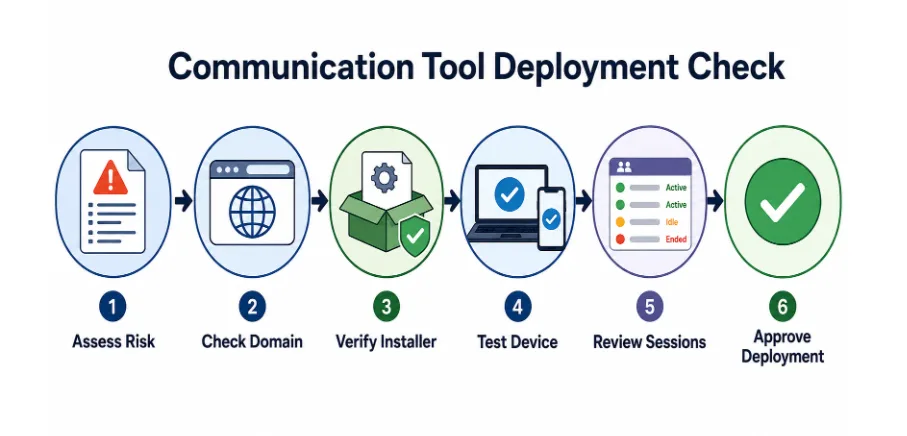

Risk assessment, information classification, domain checks, installer review, device testing and session controls should all occur before deployment.
Inspect the Installer and Operating-System Requirements
A legitimate-looking page can still provide an outdated, incompatible or unexpected installer.
Before installation, verify the file name and extension, application version, operating-system requirements, digital signature or publisher information, requested privileges, bundled applications and any warnings from the device or security software.
The organisation should also confirm that the operating system and device remain supported and updated.
An unpatched computer or a device containing several unapproved applications can create risk even when the intended messaging app is genuine.
Begin with a small pilot group. Confirm installation, sign-in, updates, notifications, language display and account recovery before wider deployment.
Maintain a basic asset record showing the device owner, operating system, application version, installation date, approved source and update status.
This record simplifies support, incident response and replacement of obsolete devices.
Review Desktop Access as a Separate Risk
Desktop access should be evaluated separately from mobile use because the device, user profile and local files may be shared or left unattended.
A mobile phone is usually controlled by one person. A Windows desktop may be used in a public office, accessed by several volunteers or remain unlocked during the working day.
A Telegram desktop access guide may help organisations document sign-in, active-session, notification and shared-computer procedures for Windows users.
The desktop review should cover device ownership, password-protected user profiles, automatic startup, notification previews, download folders, disk encryption, sign-out procedures, active-session behaviour and local backup of message-related files.
Shared computers require stricter account separation and sign-out controls.
Users should not save credentials on shared devices. Sensitive notification previews should be disabled, and downloaded attachments should be moved to approved storage or securely deleted when no longer needed.
Where practical, each staff member should use a separate operating-system account with automatic screen locking.
Control Active Sessions, Shared Devices and Lost Phones
Cross-device access improves flexibility but increases the number of places where an account may remain open.
Create a routine for reviewing active sessions rather than relying on users to remember every device they have used.
The review should identify current phones, desktop apps, browser sessions, old devices, shared office computers, unfamiliar locations and sessions associated with former staff.
Users need a clear process for reporting an unfamiliar session and removing access from a lost or stolen device.
Periodic checks are especially important for administrators and people with access to sensitive groups or contacts.
Device controls should include screen locks, strong credentials, operating-system updates, encrypted storage, automatic locking, secure backup and restrictions on public computers.
The goal is to prevent forgotten or unmanaged sessions from becoming a persistent vulnerability.
Remove Former Staff, Volunteers and Temporary Partners
Civil society groups often work with short-term volunteers, interns, consultants and partner organisations.
Temporary access easily becomes permanent when no one owns the offboarding process.
Maintain an access register showing the group, purpose, administrators, members, temporary roles, expected end date and last review.
When a person leaves, review messaging groups, shared folders, email, cloud services, administrator rights, active sessions and any organisational devices in their possession.
Removing a person from one group is insufficient if they still have access to linked systems or retained sessions.
Offboarding should be a documented checklist with a named owner and completion date.
Train Users to Recognise Phishing and Fake Login Pages
Many communication incidents begin with social engineering rather than a technical vulnerability in the application.
Attackers may use fake login pages, requests for verification codes, urgent payment messages, disguised documents, false support accounts, administrator impersonation and shortened links to credential-stealing pages.
Training should teach users to pause, inspect and verify before acting.
A practical routine includes checking the sender and domain, confirming unusual requests through another channel, never sharing login codes, reporting suspicious messages and refusing unexpected files.
Use real examples, simple language and annotated screenshots. For Hong Kong and Taiwan teams, key guidance may need consistent Traditional Chinese and English terminology.
New volunteers and temporary partners need the same training as permanent staff because they may have less experience with the organisation’s security procedures.
Prepare an Incident Plan for Lost Devices or Compromised Accounts
Even a well-managed communication system can experience loss, phishing or account compromise.
Prepare the response plan before an incident so staff do not have to invent procedures under pressure.
The plan should identify contacts, session-removal steps, credential changes, administrator transfer, affected groups, member notification, evidence preservation, escalation and secure configuration of replacement devices.
The first priority is to limit continuing access and preserve control of critical groups and accounts.
After a lost phone, review active sessions quickly. After a fake login, reset access and inspect sessions. If an administrator account is compromised, review group ownership and permissions immediately.
Document the incident, affected information, response timeline and corrective actions.
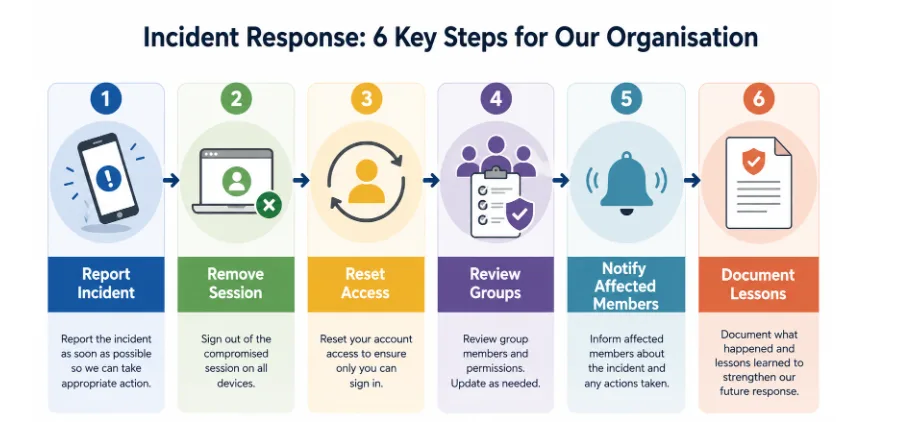

A controlled response includes reporting, session removal, access reset, group review, member notification and documentation of lessons learned.
The post-incident review should ask how access was obtained, what information may have been exposed, whether the response was fast enough and which controls, training or procedures must change.
Conclusion: Verify Before You Deploy
Messaging apps can help civil society groups, journalists and volunteer organisations coordinate across distance, but deployment should begin with verification rather than convenience.
Organisations need a risk profile, information classification, verified download source, installer check, desktop review, active-session controls, offboarding process, phishing training and incident plan.
A secure communication environment is not created by the application alone.
It depends on responsible access management, clear procedures and regular review. When these controls are built into deployment, organisations can communicate efficiently while reducing avoidable risk to staff, volunteers, contacts and communities.