Could background music get your live stream account banned?
In the e-commerce and live-streaming industries, background music may seem like just a decoration, but it can hide enormous risks. You might think a catchy pop song or a trending melody can instantly liven up your live stream, but have you realized that if copyright issues are not handled properly, this music could become a ticking time bomb? Using music without full authorization may result in live-streaming platforms issuing warnings, imposing restrictions, or even banning accounts due to copyright infringement.
Such risks are particularly prominent in e-commerce and live-streaming scenarios—from opening music, product demonstrations, to promotional countdowns, every piece of background music directly affects the audience experience. Yet once copyright problems arise, the operation of the entire live stream can be compromised.
For this reason, a growing number of content creators are seeking legal yet high-quality music solutions. And MakeBestMusic, an AI music generation platform, is becoming the top choice for e-commerce and live-streaming creators. With MakeBestMusic, you can not only quickly generate exclusive background music but also obtain clear commercial licensing, making your live streams safe, professional, and efficient.
Why is MakeBestMusic the best solution for generating music?
When you use a popular song or music from a music library, the copyright involved is extremely complicated. This means that even if you purchase a so-called “license” from a music library, you may only obtain partial usage rights—for example, it may only be allowed for personal projects, not for commercial promotion; or there may be restrictions on scope, such as being limited to specific platforms or having a cap on usage times. Furthermore, licensing status can change at any time. A song available in the library today may have its license revoked by the copyright holder tomorrow, turning your previously published content into “infringing material.” This kind of uncertainty poses huge risks for e-commerce and live‑streaming professionals.
In contrast, music generated by MakeBestMusic offers clear copyright advantages:
- Clear copyright ownership: All music created via MBM is owned by the subscriber. This is not just a usage license—you truly own the copyright to the music.
- No hidden restrictions: It can be used in any commercial scenario: e-commerce videos, live‑stream selling, brand promotion, advertising campaigns, product displays, etc. There are no platform restrictions and no geographical limitations.
- Legal documentation provided: A corresponding Commercial License can be downloaded for every generated track. You will not encounter copyright issues during live streams or promotions, ensuring safe and worry‑free music usage.
- Advantages of AI Singing: If your video or live stream requires vocal elements—such as a sung version of a product slogan—MakeBestMusic’s AI Singing feature can produce fully original vocals, which also come with complete copyright. This avoids the complex issues often involved in using real human singers.
This approach to fundamentally eliminating copyright risk is unmatched by traditional licensed music libraries.
Step-by-Step Guide: Generate Exclusive Background Music for Your Live Stream in 10 Minutes
In the e-commerce and live streaming industry, background music is far more than just simple decoration. It often directly affects user retention, the overall atmosphere of the live stream, and brand memorability. For this reason, more and more content teams are starting to pay attention to the selection of background music. With the development of AI music technology, through an AI singing generator like MakeBestMusic, creators can quickly generate custom background music based on the live stream theme, creating a more consistent content atmosphere while reducing copyright and style limitations imposed by traditional music libraries.
- Determine Music Style Keywords Based on Live Stream Type
When generating background music for a live stream, the first step is not to write prompts immediately, but to define the overall atmosphere of the live content. Different types of live streams often require completely different music styles. Choosing the right style allows the music to blend naturally into the live rhythm and create a smoother viewing experience. Therefore, when using MakeBestMusic, deciding on a style direction according to the live stream type will make it much easier to generate suitable music.
Below are several common live stream types, along with recommended music styles to use in MakeBestMusic.

- Beauty & Fashion Live Stream
Such live streams usually emphasize exquisiteness and fashion sense. Background music here serves more to create atmosphere rather than draw the audience’s attention away. If the music has an overly strong beat or is too complex, it will distract viewers from the host’s explanation and product display. For this reason, these live streams are more suited to gentle, elegant, and high-end music styles.
Recommended keywords:
- “luxurious”, “elegant”, “fashionable”
- “soft jazz”, “light electronic”, “chill-hop”
- “background music suitable for makeup tutorials”
Example description:
“A soft and elegant background music with a hint of jazz, gentle rhythm, suitable for showcasing beauty products.”
- Tech & Gadget Live Stream
Digital product reviews or tech-focused live streams usually emphasize a professional and technological atmosphere. The background music may have a mild rhythm, but the overall style should remain simple and modern, not overly complicated.
Recommended keywords:
- “techy”, “modern”, “minimalist”
- “electronic music”, “synthesizer”, “futuristic”
- “background music suitable for tech product reviews”
Example description:
“A clean and modern electronic music with a tech vibe, using synthesizer and electronic drums, stable rhythm for gadget reviews.”
- Promotion & Flash Sale Segment
When a live stream enters the promotion or flash sale phase, the role of background music changes. At this point, music is not just for atmosphere—it is used to enhance a sense of urgency and drive purchase desire. Music with a stronger rhythm and denser drum beats often helps the host liven up the atmosphere.
Recommended keywords:
- “energetic”, “urgent”, “high-tempo”
- “EDM”, “electronic dance”, “strong beat”
Example description:
“A high-tempo electronic music with strong beats, creating a sense of urgency, perfect for flash sale countdowns.”
- Write an Effective Prompt
Once you have the live stream type and style keywords, the next step is to organize them into prompts that MakeBestMusic can understand. A good prompt allows the AI to generate music accurately while controlling the mood, rhythm, and purpose, so that the result fits the live scene better. Here is a universal prompt formula for you:
[Style] + [Mood] + [Instrument/Timbre] + [Rhythm] + [Usage Description]
- Style: Describes the overall music genre and atmosphere, such as “light luxury & elegant”, “warm & healing”, “minimal & modern”.
- Mood: Expresses the emotion and intensity of the music, such as “relaxed & cheerful”, “gentle & soothing”, “energetic & urgent”.
- Instrument/Timbre: Specifies the main instruments or sounds, such as piano, synthesizer, acoustic guitar, drums, etc.
- Rhythm: Describes the tempo using BPM or speed terms, e.g., “medium-slow tempo (90–100 BPM)”.
- Usage Description: Explains the scene where the music will be used to help the AI understand the goal, e.g., “suitable for the opening of a beauty live stream”, “ideal for flash sale countdown”.
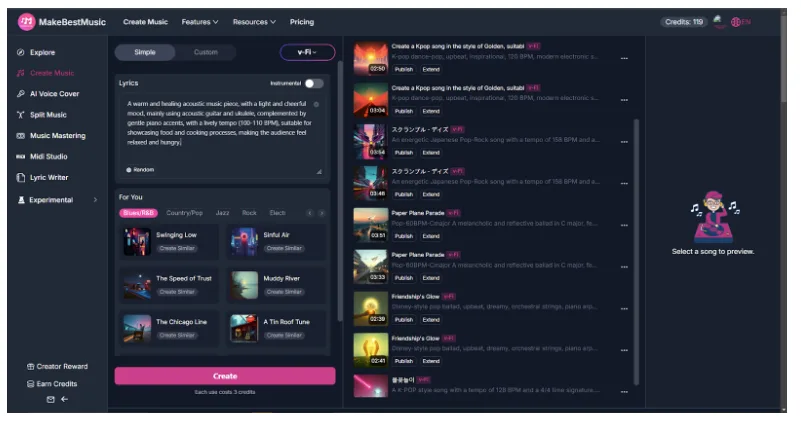

- For example, an effective MakeBestMusic prompt can be written like this:
“A warm and healing acoustic music piece, with a light and cheerful mood, mainly using acoustic guitar and ukulele, complemented by gentle piano accents, with a lively tempo (100-110 BPM), suitable for showcasing food and cooking processes, making the audience feel relaxed and hungry.”
In addition, you can add advanced instructions to make the generated results better meet the needs of e-commerce live streaming:- Match rhythm to live stream segments: Use atmospheric music for the opening to attract attention; choose light and soothing music for product displays to highlight the content; and use dynamic, tense music for flash sales or promotions to stimulate purchase desire.
- Strengthen brand tone: Select keywords according to your brand style, such as “luxurious and grand” or “relaxed and friendly“, to ensure the music aligns with your brand image.
- Optimize for loop playback: Since music may be played on a loop for a long time during live streams, you can include “seamless loop” in the prompt to ensure a smooth transition from the end back to the beginning without abrupt cuts, improving the listening experience.
- Generate Complete Live Stream Background Music with MakeBestMusic
- Step 1: Access the MakeBestMusic platform
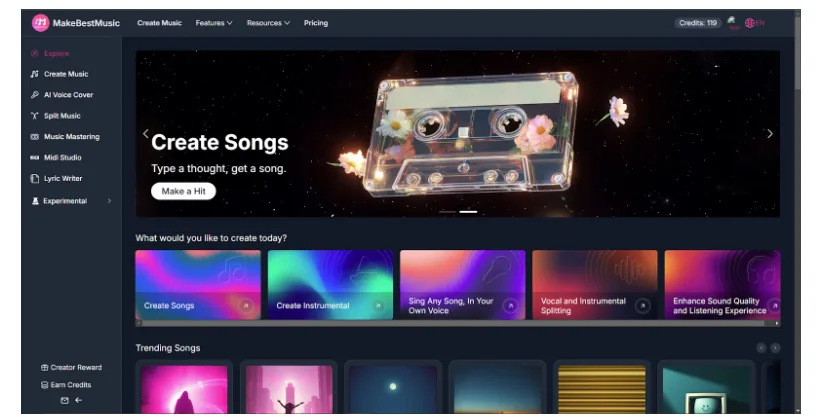
- Open MakeBestMusic and log in to your account. If you are a new user, you can register first and use the free trial quota provided by the platform. During the trial period, new users can experience MakeBestMusic’s powerful features, including creating music from scratch, generating vocal or instrumental-only versions, as well as AI cover songs and multi-track separation. After logging in, you will enter the main interface of MakeBestMusic, where all creation functions are clearly displayed in the navigation bar.
- Step 2: Enter the prompt and generate
Simple Mode: In the Create Music section of MakeBestMusic, users can select Simple Mode, paste the prepared prompt into the Lyrics input box, and then click the Create button. MakeBestMusic will generate 2 different versions of the music within a few minutes. Each version varies slightly in instrument arrangement, rhythm changes, and arrangement details, providing creators with more options to choose the one that best fits the live stream atmosphere. The generated music is complete and highly professional. Users can quickly obtain usable works without any knowledge of music theory, arrangement, or recording.
If the live stream only requires background music, you can turn on the Instrumental option. This will generate music without vocals, making it more suitable for long‑term looping and not overpowering the host’s voice.
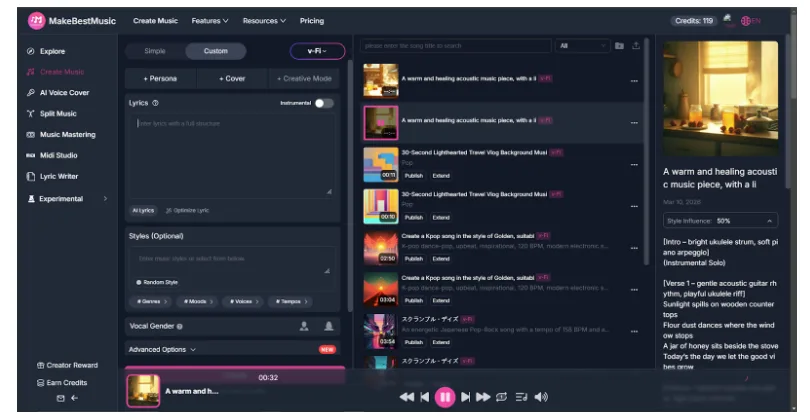

- Custom Mode: For creators who want fine-grained control over their music, Custom Mode is available. In this mode, users can enter full lyrics in the Lyrics text box and label verses, choruses, and bridges, allowing the AI to follow the lyrical structure. This results in clearer emotional progression and richer musical layers. Then, in the Styles field, further refine the music genre, tempo, overall mood, and core instrument setup—such as specifying synthesizers, acoustic guitars, or drum beats. Once these settings are complete, click Create, and the system will generate a full music production based on your lyrical structure and style preferences, matching both tempo requirements and the live streaming scene precisely.
- Step 3: Preview and Select
- After generation, preview each version one by one, paying attention to these points:
- Style match: Whether the overall style and mood align with your setup and blend naturally into the live stream atmosphere.
- Volume balance: Whether the music leaves enough headroom and does not overpower the host’s voice.
- Comfortable tempo: Whether the rhythm is smooth and natural—not too fast to feel stressful, nor too slow to feel dragging.
- Smooth looping: If looping is needed, whether the ending connects seamlessly to the beginning.
- Through repeated listening and comparison, you can select the version that best fits your live scene, ensuring the music integrates naturally into the content, improving viewer retention and experience.
- Step 4: Download and Obtain Authorization
- Once you have confirmed the final background music, simply click to download.MakeBestMusic provides a complete copyright authorization system. Each generated track comes with a Commercial License, with no additional application or communication required. This allows you to safely use the music for your e-commerce live stream openings, product demonstrations, or promotional segments, ensuring your live content is both professional and secure.
Summary
In e-commerce live streaming, background music directly affects the atmosphere of the live room, viewer retention, and brand impression. The right music makes the opening more appealing, product demonstrations more vivid, and promotional segments more exciting, thus improving the overall viewing experience. Inappropriate use of music, however, can lead to copyright risks and threaten account security.
With MakeBestMusic, creators can quickly generate exclusive background music for their live streams. The style, mood, and tempo can be precisely matched to the live content, integrating naturally with each segment to enhance professionalism and viewer experience. Meanwhile, the clear commercial licensing system ensures fully legal music use, with no worries about copyright disputes or platform bans, allowing you to safely use the music in every part of your live stream.
MakeBestMusic not only saves you time spent searching for music and handling copyright issues, but also helps you build a unique and consistent brand style. With the combination of quality content and custom music, each live stream will better attract viewers, boost conversion rates, and help your live room stand out in the highly competitive e-commerce industry.