
Have you ever wanted to hide your real location or browse the web without anyone tracking you? If you use an Android phone, changing your IP address is one of the most effective ways to stay private online. It helps you watch content from other countries and fix particular network issues. To do that, you can use a VPN, switch networks, or try a reliable proxy like IPcook. Each option works differently, and this guide will show you how to change IP addresses on Android easily and safely.
Why Do You Change IP Address on Your Android?
There are many reasons why you may want to change your IP address on Android.
- Protect your privacy and security
Changing your IP address helps protect your online privacy. It hides your real location and makes it harder for websites, advertisers, or hackers to track your activity.
- Bypass regional or content restrictions
Some websites, streaming services, or apps limit access based on your country. By changing your IP, you can access content that is not available in your region. It allows you to watch shows, visit websites, or use apps that are normally blocked.
- Avoid bans or tracking from websites
If a website or platform blocks your IP, changing it can restore access. It also helps avoid repeated tracking or targeted ads. Many users use this method to browse freely without leaving a trace of their real identity.
- Fix connection or network problems
Sometimes an unstable or slow connection can be linked to your IP. Getting a new IP can refresh your network and solve temporary issues. It also helps test internet speed, switch between networks, or connect to a more stable server.
How to Change IP Address on Android with a Proxy
The most direct and effective way to change your IP address on Android is to buy new IPs from a trusted proxy provider. A reliable proxy routes your connection through another network, giving you a fresh IP address while keeping your online activities private and secure. One popular option is IPcook, a professional proxy provider known for its large residential IP pool and stable global performance.
IPcook helps Android users hide their real location, bypass restrictions, and maintain the fastest, anonymous connections. It uses real residential networks instead of data center IPs, which makes detection much harder and ensures high stability. Its key advantages include:
- Real residential sources: All IPs come from genuine home networks, not data centers or VPS environments.
- High anonymity: Completely hides your real IP address, hides or forges all identity information in the request header, elite-level proxy.
- Massive and global IP pool: 55M+ IPs across more than 185 geographic locations, broad coverage, and reliable access to any target region.
- Fast speed: Global average response time under 0.5 seconds, as low as 50ms in key regions, to browse smoothly and without interruption.
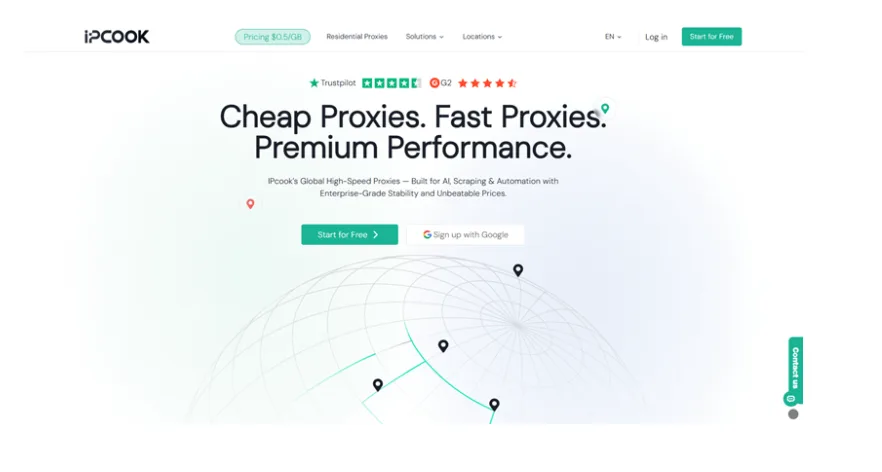

Using a proxy is simple. Follow these steps to start using IPcook on your Android phone.
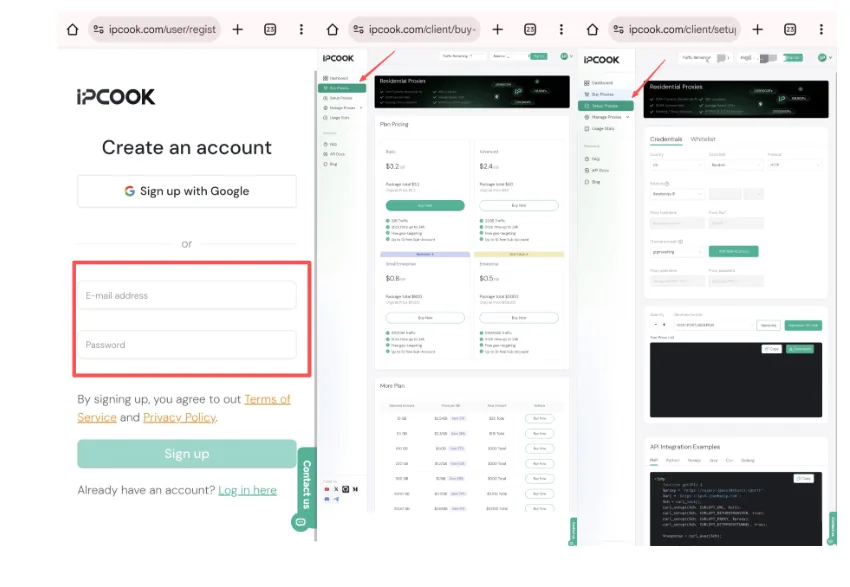
Step 1: Visit the IPcook official website. Create an account on IPcook.
Step 2: Go to Buy Proxies and click Top Up to add funds. Choose a proxy plan according to your needs.
Step 3: Next, open Setup Proxies, pick your location, protocol, and rotation mode, and save the settings.
If needed, create a sub-account to share data or set limits. After saving, your proxy details (hostname, port, username, password) will appear.

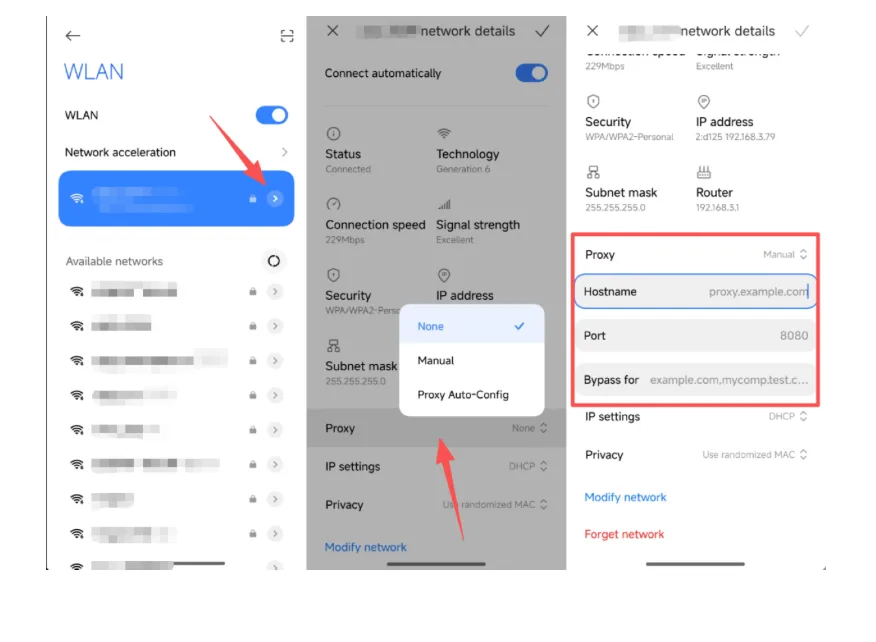
Step 4: Go to your Android phone settings, select Wi-Fi, hold the connected network, and open advanced options.
Step 5: Set the proxy type to Manual, enter the proxy hostname and port, then save. Now your Android phone connects through a proxy and uses a new IP address.

Other Methods to Change IP Address on Android
Besides using a proxy, there are other simple ways to change your IP address on Android. These methods may not be as stable as a proxy, but they are easy to try.
1. Use a VPN to Get a New IP for Your Android
A VPN is one of the easiest and safest ways to change your IP address on your phone. It builds an encrypted tunnel between your phone and the internet, keeping your online data private. When you connect to a VPN server, your device shows the server’s IP address instead of your real one. You can choose a location from many countries to appear as if you are browsing from another region.
Pros:
- The setup process is straightforward and requires minimal technical knowledge, making it accessible for most users.
- It provides strong privacy protection by encrypting your internet traffic and hiding your real IP address.
Cons:
- The connection speed may be slower due to the encryption process and routing through remote servers.
- The connection can sometimes be unstable, especially when using distant or overloaded VPN servers.
2. Change IP Address on Android via Tor
The Tor Browser is another effective way to hide your IP address on Android. If you’re wondering how to change IP addresses on Android, Tor offers a free and secure solution. You can download it from Google Play, open it, and start browsing safely. Tor routes your internet traffic through several random servers around the world, giving you a different IP each time. This process makes it very hard for websites or trackers to know your real location.
Pros:
- It ensures your online identity remains hidden by encrypting and redirecting your internet traffic to multiple nodes.
- It is completely free to use, making it an accessible privacy tool for everyone.
Cons:
- Browsing speeds can be significantly slower due to the multiple encryption layers and rerouted connections.
- Some websites may block Tor traffic or frequently display CAPTCHA requests, making access less convenient.
3. Connect to a Public Wi-Fi Network
Connecting to public Wi-Fi is a quick and free way to change IP address on Android. When you join a different network, your Android phone automatically receives a new IP from that Wi-Fi’s system. This can be useful if you want to refresh your connection or appear on another network. However, public Wi-Fi is not always safe. Hackers can monitor data on open networks and steal sensitive information.
Pros:
- It’s completely free to use, allowing you to change your IP address without paying for additional services or tools.
- It’s an instant solution. Simply connecting to a different public Wi-Fi network automatically assigns your device a new IP address.
Cons:
- Public Wi-Fi networks often lack proper encryption, which makes your data vulnerable to interception by hackers.
- These networks can also expose your device to malware or phishing attacks.
4. Switch to Your Mobile Data
How do you change your IP address on Android using mobile data? It’s simple, just turn off Wi-Fi and use mobile data. Mobile carriers typically assign dynamic IP addresses, so you’ll likely get a new IP address each time you reconnect. This is a convenient option if you need to quickly change your IP address without using any tools or apps. Furthermore, mobile networks are more secure than public Wi-Fi because they use stronger encryption.
Pros:
- Works anytime, since mobile networks are available almost everywhere and provide a stable internet connection.
- Keeps your data private because mobile carriers use encrypted connections, reducing the risk of interception or tracking compared to public Wi-Fi networks.
Cons:
- You can use up mobile data quickly, which might lead to reduced speeds once your data limit is reached.
- May increase your monthly cost if your data plan has limited usage or if extra charges apply for exceeding your data allowance.
5. Request a New IP from Your ISP
If you prefer an official and stable solution, you can contact your Internet Service Provider (ISP) and request a new IP address. Some ISPs can assign a new one after restarting your router, while others may require a manual reset from their system. This is one of the simplest ways to change the IP address on Android securely. However, not every provider supports quick changes.
Pros:
- Getting a new IP from your ISP is secure and avoids using risky third-party tools.
- Your internet connection stays steady because the ISP handles the change properly.
Cons:
- It might take hours or days for your ISP to give you a new IP.
- Some ISPs don’t let users change IPs easily or may refuse the request.
FAQs About Changing IP Address on Android
Q1. Is it safe to change IP address on Android?
Yes. It is generally safe as long as you use reliable tools such as VPNs or residential proxies. These services encrypt your traffic and hide your real IP from websites or trackers. However, unsafe or free tools from unknown sources may collect your data or cause connection problems.
Q2. Can I change IP on Android for free?
Yes. You can change your IP address on Android for free by connecting to public Wi-Fi, switching to mobile data, or using free VPNs. These methods are quick and simple but may have speed limits or weak protection. If you need stable and secure IPs, IPcook also provides a free trial for testing its proxy service.
Summary
This guide has shown you how to change IP address on Android in 6 different ways. You can use a VPN, install Tor, switch mobile data, connect to public Wi-Fi, or request a new IP. Among them all, the most stable and secure way is through a residential proxy. A trusted service like IPcook gives you fast speed, full privacy, and millions of IPs to choose from. If you need a reliable way to stay anonymous online, try a proxy and see how easy it is to change your IP address on Android.