Hulu’s extensive streaming library is only available in the US and Japan because of licensing restrictions.Due to these geo-restrictions, travelers, expats, and anyone outside these service areas frequently encounter the frustrating “Hulu is not available in your region” error. This guide provides solutions to access Hulu content, focusing on downloading videos for offline viewing with Keeprix Hulu Downloader to bypass these regional blocks entirely.
Understanding Hulu’s Regional Restrictions
Hulu’s regional lockouts stem from licensing and copyright agreements. Content rights are sold for specific territories, preventing streaming elsewhere. This impacts:
- International Travelers: Subscriptions become unusable abroad.
- Expats/Residents Abroad: Cannot access Hulu from unsupported countries.
- Users in Unsupported Countries: Blocked from signing up or streaming.
The inability to stream or download officially outside these regions highlights the value of offline access. Downloading content beforehand removes real-time geo-restrictions, offering true viewing freedom.
Method 1: Download Hulu Videos Using Keeprix Hulu Downloader
Keeprix Hulu Downloader provides an effective way to bypass Hulu’s geo-restrictions by allowing you to download its content directly to your device. This means you can save Hulu videos in widely compatible formats like MP4 or MKV, which can then be watched offline on any device, regardless of your location.
Key benefits of Keeprix Hulu Downloader:
- Offline Access: Watch downloaded Hulu content without an internet connection.
- Geo-Restriction Bypass: Eliminates the “not available in your region” error for downloaded content.
- High Quality: Supports downloads up to 4K resolution, preserving the original video quality.
- DRM Removal: Removes Digital Rights Management (DRM) protection, allowing for flexible playback on various devices.
- Ad-Free Playback: Downloaded videos are free of commercials, even if your Hulu plan includes ads.
- Metadata Preservation: Retains important information like episode titles, thumbnails, and subtitles.
- Universal Compatibility: Saves videos in MP4 or MKV formats, compatible with virtually all media players and devices.
Requirements:
- A computer (Windows or Mac).
- An active Hulu account.
- Keeprix Hulu Downloader software.
- A stable internet connection for downloading.
Steps to use Keeprix Hulu Downloader:
1.Download and Install Keeprix: Once downloaded, follow the installation prompts to install it on your computer.
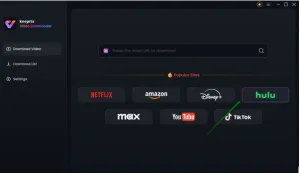

2.Log in to Hulu: Launch Keeprix. Within the application, you’ll find an integrated browser; log in to your Hulu account with your credentials.
3.Search or Paste URL: Once logged in, you can either browse Hulu’s content library directly within the Keeprix interface or paste the URL of a specific show or movie you wish to download from your web browser.
4Choose Settings: Before downloading, Keeprix allows you to customize your preferences. Select the desired video quality, choo.se audio tracks, select your preferred subtitle languages, and pick the output format (MP4 or MKV).
5.Download Content: After configuring your settings, click the “Download” button. Keeprix will then begin downloading the video to your specified location on your device.
6.Watch Offline: Once the download is complete, you can access the saved video files anytime, anywhere, on any compatible device, without needing an internet connection or facing regional restrictions.
Tips: Keeprix also supports batch downloads, which is incredibly useful for downloading entire seasons of your favorite shows.
Method 2: Use a VPN to Access Hulu
VPNs bypass geo-restrictions by masking your IP address, making Hulu think you’re in a supported region (e.g., US). This allows for real-time streaming.
Requirements:
- Reliable premium VPN (e.g., NordVPN, CyberGhost, ExpressVPN).
- Active Hulu subscription.
- Compatible device.
Steps:
- Pick & Set Up a VPN: Choose a reliable VPN known for bypassing Hulu’s restrictions, with plenty of US servers. Download and install the app.
- Connect to a US Server: Launch the VPN and connect to a server located in the United States.
- Log in to Hulu: Access Hulu via app or browser and stream.
- Troubleshoot Issues: If blocked, clear cookies, disable ad blockers, or switch servers.
Pros: Real-time streaming, legal, secure (with reputable VPN), multi-device use.
Cons: Requires stable internet, some VPNs may be detected by Hulu, recurring subscription cost.
Tips: Use a premium VPN with dedicated US servers; check device compatibility.
Method 3: Update Hulu Home Network Settings (for Hulu + Live TV users in the US)
This method is for Hulu + Live TV subscribers within the US facing location errors. Hulu + Live TV uses your home network to determine local channel access.
Requirements:
- Hulu + Live TV subscription.
- Non-mobile internet connection (home Wi-Fi).
- Supported streaming device or browser.
Steps:
- Sign in & Access Settings: Log in to Hulu.com, go to “My Account,” then “Privacy and Settings.”
- Set or Update Home Network: Select “Set or Change Home” and input your current ZIP code.
- Save & Restart: Confirm changes (limited to 4 per year). Restart and log back into Hulu.
Pros: Official solution, no extra cost, fixes IP errors within the US.
Cons: US-only, limited to Hulu + Live TV, limited yearly changes.
Tips: Use a residential internet connection; contact Hulu Support if problems persist.
FAQs
- Is Keeprix Hulu Downloader safe?
Yes, it’s generally malware-free from official sources and uses secure encryption.
- Can I use Keeprix without a Hulu subscription?
No, a valid Hulu account is required for Keeprix to download content.
- Why does Hulu still show a region error with a VPN?
Hulu’s VPN detection is sophisticated. Try clearing cookies, switching servers, or using a more robust premium VPN like NordVPN.
- Can I update my Hulu home network outside the US?
No, this setting is for US-based Hulu + Live TV subscribers only.
Conclusion
Navigating Hulu’s regional restrictions can be a challenge, but several effective strategies exist to ensure you can enjoy your favorite content. Keeprix Hulu Downloader stands out as an excellent solution for those seeking permanent, offline access to Hulu content, regardless of their current location. Its ability to download high-quality, ad-free videos with metadata preservation offers unparalleled flexibility