Creating explainer videos has never been easier with Vindoz AI, a powerful tool that simplifies video production. This ISO/IEC 20071-certified tool adds an extra layer of security, ensuring high-quality outputs while adhering to global standards. Whether you are a small business owner, marketer, or content creator, Vidnoz AI allows you to produce professional-quality explainer videos effortlessly. With access to over 2800 video templates, 1500+ realistic avatars, and an extensive library of video creation material, you can easily produce various videos, including explainer videos, product demos, tutorials, and more.
Part 1: Key Features of Vidnoz AI for Creating Explainer Videos
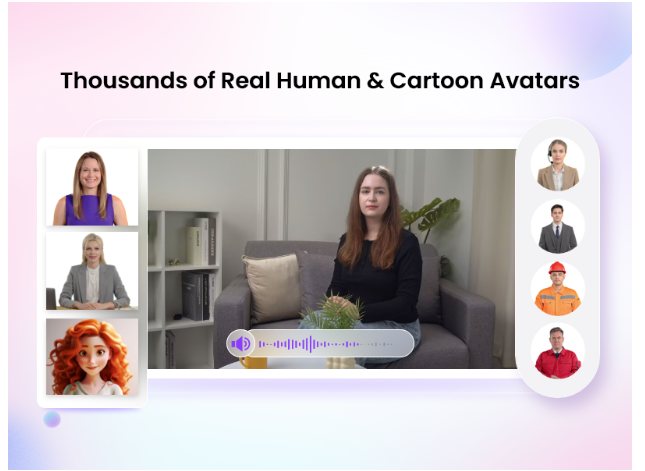

Vidnoz AI offers impressive features, including customizable templates, realistic avatars, and AI voices. Here are the top features of this program that make it ideal for creating explainer videos:
- 2800+ Video Templates: The program has a large number of video templates for a variety of projects and topics, including explainer videos, news, company presentations, and more. Pre-designed video templates allow you to start the video production process quickly, efficiently, and smoothly.
- Facial Gestures Avatars: With over 1380+ AI avatars representing various industries and roles, Vidnoz AI offers avatars of doctors, nurses, students, and teachers. The best feature of these avatars is their head pose and expression control, enabling real-time reactions.
- High-Quality AI Voices: The program offers 1500+ AI voices, all powered by Elevenlabs, Microsoft, and Google. With this tool, you will get realistic voices of celebrities, singers, and politicians. Notable voices include Selena Gomez, Taylor Swift,t, and many others.
- Avatar Lite: This feature lets you create a digital twin of yourself, perfectly replicating your voice and appearance. It is available in the free version and can be used for seven days.
- Easy AI Video Editor: Users can cut and trim footage, add animated effects, change backgrounds, and do more with Vidnoz AI Video Editor. This video editor also allows you to add subtitle effects for free.
- Ultra-Fast Video Generation: Vidnoz AI allows users to explore the program’s advanced features for free. Further, it also allows you to download the video immediately after generation.
- User-Friendly: The program offers an easy-to-use interface, which is best for beginners and non-tech users. Further, it is a web-based program, meaning no software downloading and installation is required to use the tool.
- AI Video Wizard: Users can generate videos in minutes from a single prompt or any source material by using AI Video Wizard.
Part 2: How To Use Vidnoz AI to Create Explainer Videos?
With Vidnoz AI, users can create various videos, including explainer videos, how-to guides, breaking news, product demos, and more. Simply follow the steps below to begin your video creation journey with Vidnoz AI:
- Select AI Avatar and Templates
Visit the official Vidnoz AI website and click the “Create a Free Video” button. Log in to your account, then select a template and AI avatar for your video.
- Create a VoiceOver for Explainer Video
Utilize the text-to-speech feature by entering your text. Choose the AI voice for your avatar and select the desired language. The program supports multiple languages, including English, Spanish, French, and more.
- Personalized Video with AI Video Editor
Now, use this program’s free AI video editor and add some custom touches. You can add different types of material to your video, such as background music, stickers, and much more.
- Preview and Download
Once all the settings are complete, click the “Generate” button, and your video will be ready in seconds. Preview the AI-generated video and click the download button to save it in popular format.
Part 3: FAQs Related to Vidnoz AI
-
How Many Languages Does Vidnoz AI Support?
Vidnoz AI supports 140+ languages, including English, Turkish, French, Russian, Spanish, and more. You can use this tool to translate videos in various languages. Simply upload your video, select the voice you want to translate, and the tool will automatically translate your video.
-
Does Vidnoz AI Offer a Free Version?
Vidnoz AI offers a free version that allows users to create one-minute videos daily. This tool’s free version offers features like templates, AI voices, AI avatars, Avatar Lite, and more. However, to access all of this program’s features, we recommend choosing the premium plan.
Part 4: Conclusion
With Vidnoz AI, you can easily create various videos, including explainer video, How-to Guides, tutorials, Product demos, and more. In this guide, we have mentioned this program’s top features, providing a step-by-step guide for creating an explainer video. After reading this guide, you can easily create explainer videos using Vidnoz AI.