Armor trims are one of Minecraft’s most exciting customization features, allowing players to personalize their gear with unique designs and materials. Whether you want to showcase your creativity or create a distinctive look for your team, learning how to craft the best armor trim in Minecraft is essential.
For players on a multiplayer server, sharing your custom designs adds a new level of fun. If you’re playing on a hosted Minecraft server, like those provided by Godlike, you can showcase your armor trims to friends and community members seamlessly. Godlike ensures your server runs smoothly, allowing you to focus on creating the best Minecraft armor trim combos without lag or interruptions.
What Are Armor Trims in Minecraft?
Armor trims are decorative patterns that can be applied to armor pieces in Minecraft. Introduced in version 1.20, they allow players to customize their armor using unique templates and materials. While trims don’t provide additional protection, they offer a stylish way to stand out in both single-player and multiplayer worlds.

Materials for Armor Trims
To create the best armor trim in Minecraft, you’ll need:
- Armor Trim Smithing Templates
- Found in various structures like bastions, end cities, and ancient cities.
- Each template has a unique design corresponding to its structure.
- Armor
- Any type of armor can be customized, including leather, iron, diamond, and netherite.
- Trim Materials
- A variety of materials can be used, each offering a different color:
- Iron
- Copper
- Gold
- Lapis Lazuli
- Emerald
- Diamond
- Netherite
- Amethyst
- A variety of materials can be used, each offering a different color:
How to Add Armor Trims
Step 1: Find a Smithing Table
- Locate or craft a smithing table using two iron ingots and four planks.
Step 2: Collect a Smithing Template
- Explore structures like bastions or end cities to find templates. For example:
- Sentry Trim: Found in pillager outposts.
- Tide Trim: Found in ocean monuments.
- Silence Trim: Found in ancient cities.
Step 3: Choose Your Armor and Material
- Select the armor piece you want to customize and a material for the trim.
Step 4: Apply the Trim
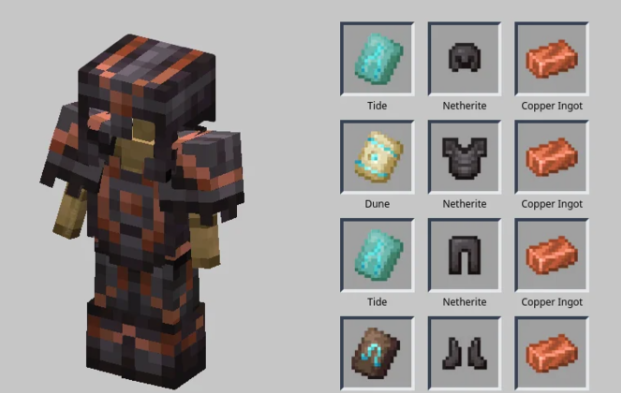
- Place the smithing template, armor, and material in the smithing table to craft your trimmed armor.
Minecraft Best Armor Trim Combinations
Here are some best Minecraft armor trim combos for style and creativity:
1. Royal Guardian
- Armor: Diamond
- Trim: Vex Template
- Material: Gold
- Why It Works: The combination of diamond blue and gold trim creates a regal look.
2. Nether Knight
- Armor: Netherite
- Trim: Spire Template
- Material: Amethyst
- Why It Works: The dark netherite paired with the purple amethyst gives a mysterious, powerful vibe.
3. Ocean Explorer
- Armor: Iron
- Trim: Tide Template
- Material: Lapis Lazuli
- Why It Works: The lapis trim perfectly complements the oceanic theme.
4. Forest Ranger
- Armor: Leather
- Trim: Sentry Template
- Material: Copper
- Why It Works: The copper trim enhances the earthy tones of leather armor.
5. Frozen Warrior
- Armor: Diamond
- Trim: Snout Template
- Material: Iron
- Why It Works: The combination of icy diamond blue with silver trim evokes a cold, strong aesthetic.

Tips for Creating the Best Armor Trim in Minecraft
- Match Your Environment
- Choose trims and materials that complement the biome or setting you frequent, like copper for deserts or lapis for underwater builds.
- Coordinate with Friends
- On a hosted Minecraft server, coordinate trim styles with teammates to create a unified look.
- Experiment with Colors
- Test different material combinations on various armor types to find unique designs.
- Show Off Your Style
- Display your trimmed armor in item frames or wear it during community events.
Why a Reliable Minecraft Server Matters
If you’re creating custom armor trims or building intricate worlds, having a reliable multiplayer server is essential to showcase your creations and collaborate with others. When choosing a server host, consider the following key factors:
- Seamless Performance
A good hosting provider ensures lag-free gameplay, even with customizations like mods, plugins, or resource-intensive builds. - Easy Setup
Look for a hosting service that offers a user-friendly control panel, making it simple to set up and manage your server. - 24/7 Support
Access to reliable customer support ensures that any technical issues can be resolved quickly, keeping your server running smoothly. - Customization Options
The ability to install mods, plugins, and other enhancements allows you to tailor your server experience to your specific needs.
Choosing the right Minecraft server host will allow you to share your creations, collaborate with friends, and enjoy a seamless and engaging multiplayer environment.

Final Thoughts
Creating the best armor trim in Minecraft is a fun way to personalize your gameplay and showcase your creativity. Whether you’re exploring new biomes, constructing massive structures, or battling mobs, stylish armor trims add a unique touch to every moment of your adventure.
Playing on a hosted Minecraft server enhances the experience even further. A reliable server allows you to share your designs with others and enjoy uninterrupted multiplayer gameplay. Choosing a dependable hosting provider ensures smooth performance, making it easier to collaborate with friends and show off your creativity.
Start experimenting with armor trims today and craft stunning combinations that reflect your personal style!